
One email parser, every Zapier app downstream
Zapier moves your data. Parseur decides what the data is. Parseur is the AI email parser for Zapier that reads email bodies, PDF attachments, and scanned documents, then fires a Zap with named fields instead of a wall of text. Zapier's built-in email parser cannot open an attachment. Parseur can.
-
PDF and scanned attachments
Parseur extracts vendor, totals, dates, and line items from the PDFs and scans arriving as email attachments, then hands each field to Zapier. This is the gap Zapier's own email parser leaves open.
-
Lead and enquiry notifications
Parseur pulls name, email, phone, and message out of the notification emails your forms and lead providers send, so a single Zap can create the CRM record and post to Slack at once.
-
Orders and repeating tables
Parseur splits repeating rows such as order lines into separate items, so Zapier can write one spreadsheet row per line instead of dumping everything into one cell.
How the Zapier integration works
-
1. Create your Parseur mailbox
- Sign up and get a dedicated email address where your documents land.
-
2. Forward your emails
- Send emails manually or set up auto forwarding so every new one arrives on its own.
-
3. AI extracts the data
- Parseur reads each email and pulls out the fields you need as structured data.
-
4. Data lands in Zapier
- Parseur pushes the parsed data straight to Zapier in real time with the native integration.

What is Parseur?
Parseur is a powerful document processing software to extract text from emails, PDFs and documents and automate your workflow. All Parseur features.

What is Zapier?
Zapier is an online automation tool that connects apps together. You can connect two or more apps to automate repetitive tasks without coding or relying on developers to build the integration.
Trusted for Zapier workflows in production
BuildYourBnB, a short-term rental business hosting over 10,000 guests per year, runs Parseur with Zapier to route booking and payout email data into Slack and Airtable automatically. Founder Boris Mordkovich tested Parseur against Zapier's own email parser and found it more accurate on the rich HTML emails that booking platforms send.
- Guests hosted per year on Parseur-powered Zapier workflows
- 10,000+
- Documents processed by Parseur since 2016
- 100M+
- Parseur rating on Capterra and GetApp
- 5/5
Zapier has its own built-in Email Parser. It's free, it's fast to set up, and it works well for simple email body text. The limitation is that it can't touch PDF attachments, it breaks when a sender reformats their email, and it has no OCR for scanned documents.
Adding Parseur's email parsing software as the trigger in your Zap replaces that parser with an AI-powered extraction layer that handles email bodies, PDF attachments, scanned documents, and changing layouts, then sends the clean, structured data into your Zapier workflow exactly as before.
A 2025 Parseur and QuestionPro survey found that employees spend more than 9 hours per week moving data out of emails and documents into other tools, at an average cost of $28,500 per employee per year. For teams already using Zapier, Parseur slots in as the extraction layer and removes that cost for recurring document workflows.
Key Takeaways
- Parseur extracts data from email bodies and PDF or image attachments using AI, then triggers your Zapier workflow with the structured results.
- Zapier's built-in Email Parser doesn't process attachments or adapt when email layouts change. Parseur does both.
- One Parseur trigger can run a multi-step Zap routing data to several apps in sequence: a CRM, a spreadsheet, a Slack channel.
- No coding is required on either side. Setup takes under 30 minutes for most workflows.
- Both Parseur and Zapier have free plans. The Parseur trigger works on all Zapier plan tiers.
Parseur + Zapier vs Zapier's built-in Email Parser
Zapier's Email Parser is the obvious starting point for Zapier users who need to extract email data. Here's where it stops working:
| Zapier Email Parser | Parseur + Zapier | |
|---|---|---|
| Email body text | Yes | Yes |
| PDF attachments | No | Yes |
| Scanned documents | No | Yes, with OCR |
| Adapts to layout changes | No, templates break | Yes, AI-powered |
| Destination apps | 7,000+ via Zapier | 7,000+ via Zapier |
| Setup time | Under 5 minutes | Under 30 minutes |
If your emails are simple text notifications with a consistent format and no attachments, Zapier's built-in parser is fine. If your emails contain PDFs, vary in format, or come from multiple senders, Parseur gives you a more reliable extraction layer without changing anything else in your Zapier workflow.
What you can build with Parseur and Zapier
Parseur customers use this combination to automate document-heavy workflows across every team:
- Lead capture: Contact form notification emails are parsed by Parseur and trigger a Zap that creates a new contact in HubSpot or another CRM. See the lead email guide.
- Invoice processing: Supplier invoice PDFs arrive by email. Parseur extracts vendor, amount, due date, and line items, then Zapier logs each invoice to QuickBooks and a tracking spreadsheet. See the invoice processing guide.
- Order management: E-commerce order confirmation emails are parsed and routed to a fulfillment sheet and a Slack channel simultaneously.
- Google Alerts to Airtable: Digest emails from Google Alerts are parsed and each article is added as a new Airtable record automatically.
- Spreadsheet logging: Parsed email data feeds into Google Sheets in real time as each email arrives.
How the integration works
The flow has three steps:
- A new email or document arrives in your Parseur mailbox
- Parseur extracts the structured fields you defined and triggers your Zap
- Zapier routes the data to your connected apps in the order you've set up
You configure the extraction in Parseur and the routing in Zapier. After that, every new email of that type is handled automatically.
Step-by-step: Set up Parseur with Zapier
The example below uses Google Alerts emails routed to Airtable, but the same steps work for any document type and any Zapier-connected app.
Step 1: Forward your emails to Parseur
Set up an auto-forwarding rule from Gmail or Outlook so that every new matching email goes to your Parseur mailbox automatically.
Step 2: Parseur AI engine extracts the data
For supported formats, Parseur processes the email automatically using its advanced AI tool.
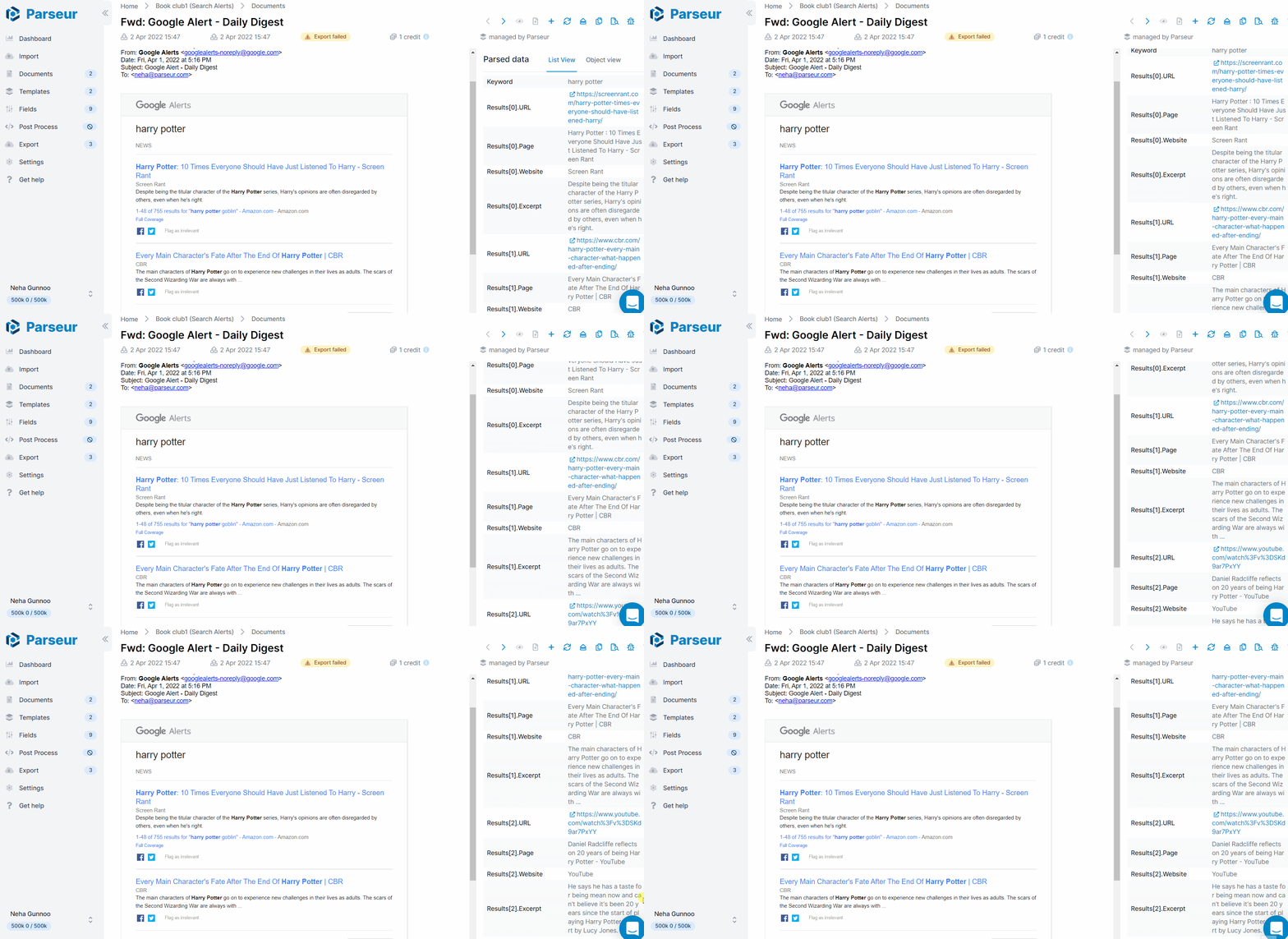
Step 3: Connect Parseur to Zapier
In Parseur, go to Export, then Zapier, and search for your destination app. For this example, search for Airtable.
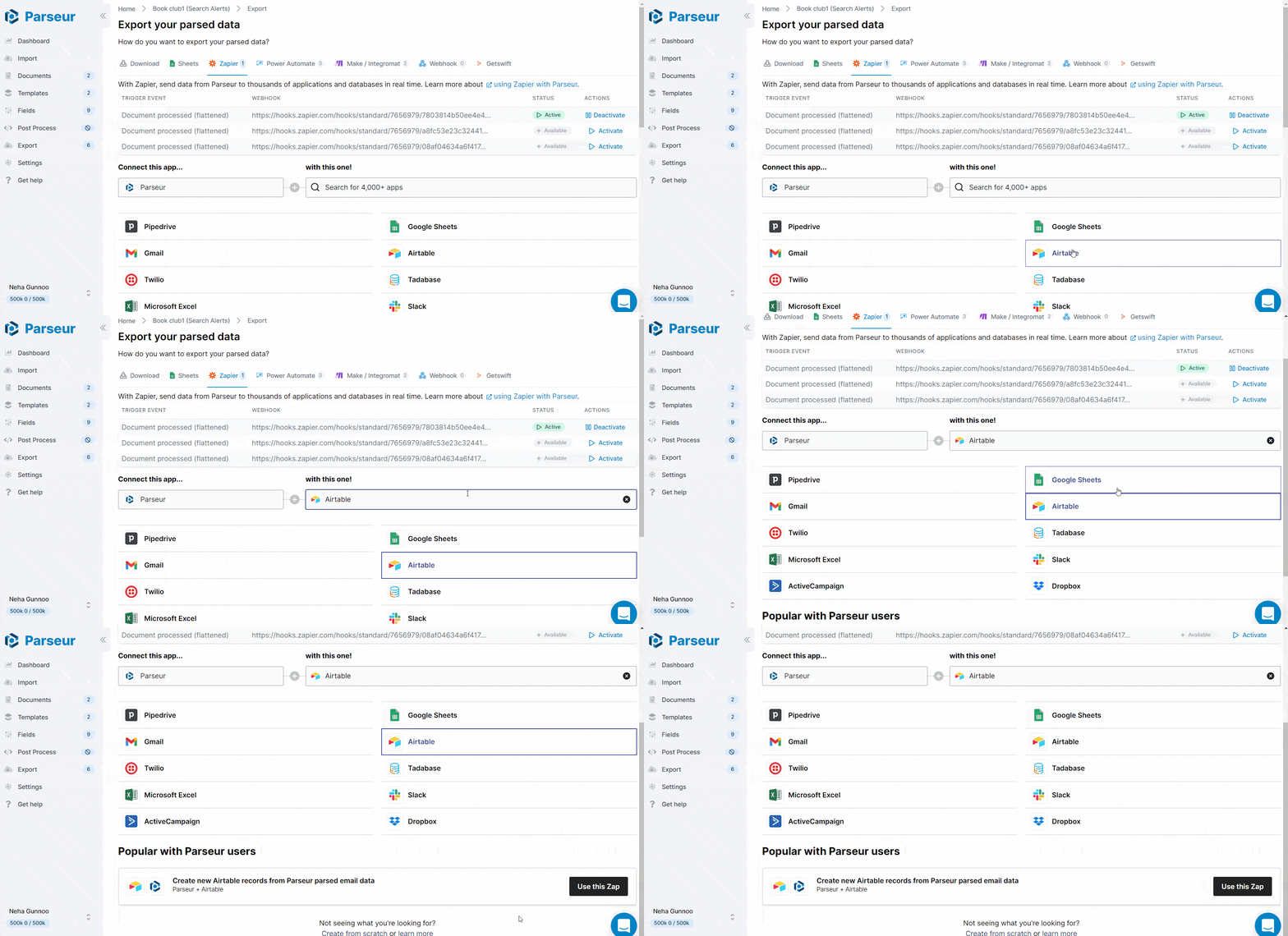
You'll be redirected to Zapier with the Parseur trigger already configured.

Step 4: Configure the Zap
Connect your Parseur account in Zapier and select the mailbox that holds your parsed data.

Then connect your destination app. For Airtable, select the base and table where you want the data to land.


Map the Parseur fields to the correct columns in your destination app.

Step 5: Test and activate
Send a test to confirm the data flows correctly into your destination app.


Once the test passes, turn the Zap on. Every email your Parseur mailbox receives from that point triggers the Zap automatically.

Sending parsed email data to Google Sheets via Zapier
Follow the tutorial below to route parsed data to Google Sheets via Zapier.
Zapier, Make, or Power Automate?
Zapier is the fastest path to a working automation for simple or linear multi-step workflows. If you need branching logic, data transformation between steps, or routing to multiple destinations at once, Make gives you more flexibility. If your team is already in the Microsoft 365 ecosystem, Power Automate keeps everything within Microsoft's tooling. For a detailed comparison, see the Zapier vs Make vs Power Automate guide.
Very easy to use and set up, if you plug it with Zapier you can set up a simple email parsing pipeline in less than one hour. - Proprioo
Free tools for related document types
If you need to convert standalone documents without setting up a full workflow, these free tools handle single files in the browser:
- PDF to Excel converter: extract data from a PDF into a spreadsheet
- Invoice to Excel converter: pull line items and totals from an invoice PDF
- PDF to CSV converter: convert PDF table data to a CSV file
If the same document type arrives regularly by email, the full Parseur and Zapier integration processes each one automatically as it arrives.


