Turn incoming email into a task with a real deadline
Todoist keeps the list. Parseur decides what belongs on it. Parseur reads each incoming email, extracts the request and the date it is actually due, and creates the Todoist task through Zapier with its project, priority, and deadline already set. Todoist's own email address makes a task named after the subject line and stops there.
-
Job and service requests
Parseur extracts the reference, site, and requested date from a request email and sets them as the task title, description, and due date in one step.
-
Invoices and payments due
Parseur reads the due date off an invoice, including PDF attachments, so the task to pay it lands in Todoist scheduled for the right day rather than whenever someone remembers.
-
Follow-ups on new enquiries
Parseur pulls the contact name and request out of enquiry emails so each lead becomes a named follow-up task instead of an unread message in a shared inbox.
How the Todoist integration works
-
1. Create your Parseur mailbox
- Sign up and get a dedicated email address where your documents land.
-
2. Forward your emails
- Send emails manually or set up auto forwarding so every new one arrives on its own.
-
3. AI extracts the data
- Parseur reads each email and pulls out the fields you need as structured data.
-
4. Data lands in Todoist
- Zapier picks up the parsed data and sends it to Todoist in real time.

What is Parseur?
Parseur is a powerful document processing software to extract text from emails, PDFs and documents and automate your workflow. All Parseur features.

What is Todoist?
Todoist is a cloud-based service and task manager that helps users to organize their tasks effectively. You can access Todoist on any device as everything stays in sync. Todoist is used by 25 million users all over the world for better planning and collaboration on projects.

What is Zapier?
Zapier is a cloud automation tool that connects apps together. You can connect two or more apps to automate repetitive tasks without coding or relying on developers to build the integration.
Trusted for email-driven task workflows in production
BuildYourBnB, a short-term rental business hosting over 10,000 guests per year, uses Parseur with Zapier to turn platform emails into structured records and real-time notifications across its tools. It is the same pattern this Todoist integration follows, with a task list as the destination.
- Guests hosted per year on Parseur-powered workflows
- 10,000+
- Documents processed by Parseur since 2016
- 100M+
- Parseur rating on Capterra and GetApp
- 5/5
Let's take the case where you manage a team and different tasks have to be created in Todoist on a daily basis. You receive emails from your customers, suppliers or any other organization. In order to keep track of every task and assign those to your team members, you have to go through your emails and create tasks in Todoist manually.
What if you could automate this manual process so that you can have more time in organizing and planning your tasks?
Integrating Todoist with Parseur
Parseur is a powerful document processing tool that automates the data extraction from emails and PDFs. The parsed data is sent to any business application of your choice in real-time, helping you to save countless hours of manual tasks.
By integrating Todoist with Parseur, you will be able to automate the manual process of creating tasks from your emails to Todoist.
How does the integration work?
Step 1: Sign up for your free plan and create your Parseur mailbox
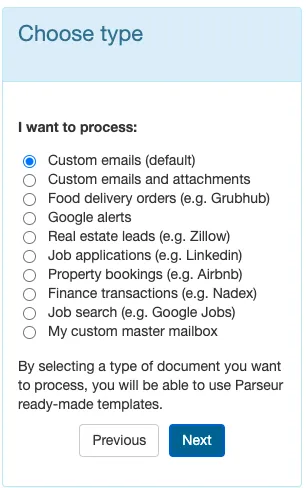
Once your account is set up, it's time to create your Parseur mailbox.
Select "Custom emails (default)" to create your mailbox.
Step 2: Forward your email to the Parseur mailbox
You will receive an email address for the mailbox so that you can forward the email to your Parseur mailbox. The email will arrive in your mailbox within less than 10 seconds.
Step 3: Teach Parseur which data needs to be extracted to send to Todoist
Parseur is a no code tool which means that with zero coding knowledge. You don't need to create any parsing rules as well. Our AI tool was created for different industries such as real estate, Google alerts, food ordering and short term rentals among others.
You can also create custom templates! Every time an email arrives in your mailbox, Parseur will pick up the right template automatically and extract data from it.
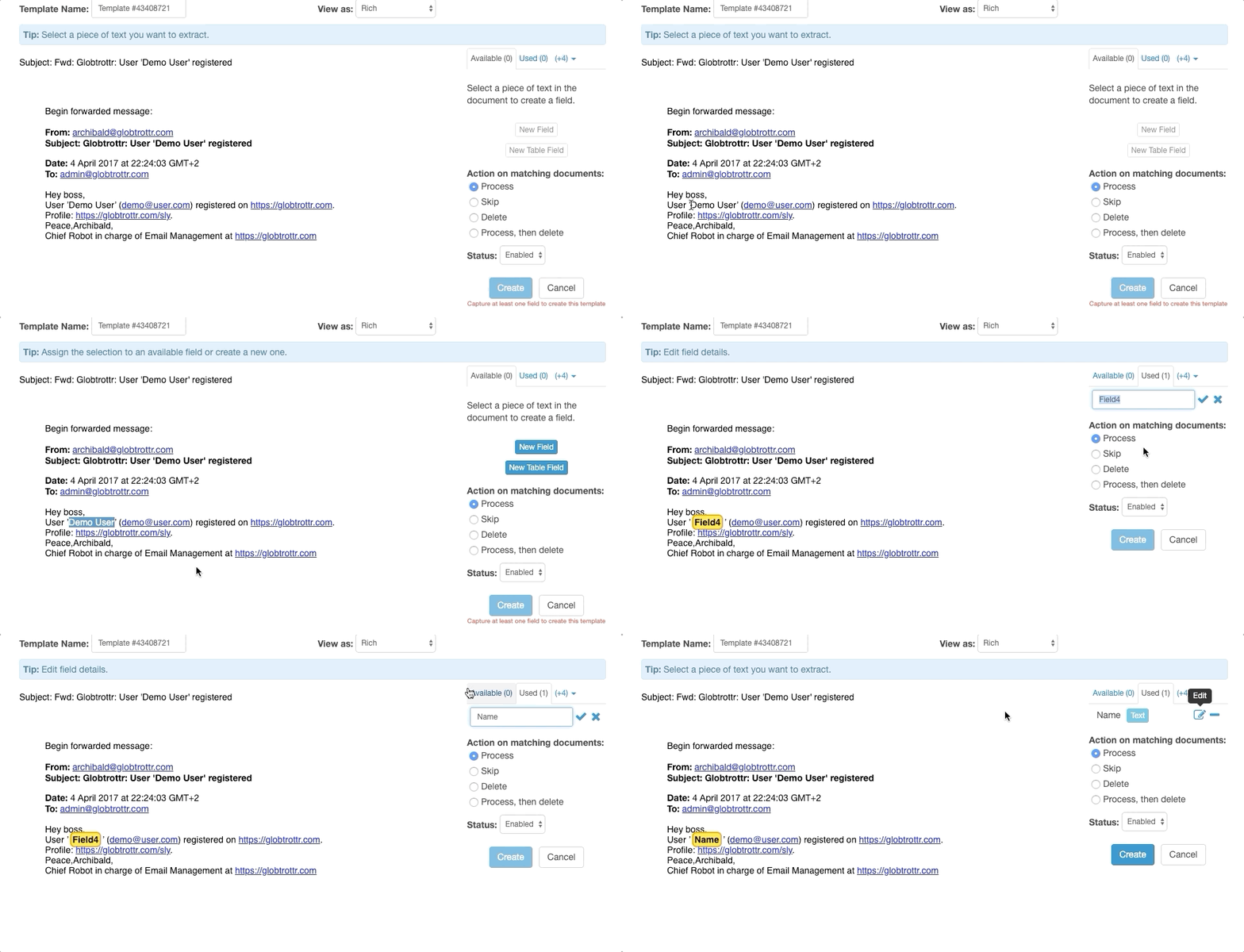
Highlight the data that needs to be extracted and create data fields for them.
Once the template has been created, every other similar email that you send to your Parseur mailbox will be automatically parsed. You can also set up an auto-forwarding rule to forward emails automatically.
Step 4: Create Todoist tasks using the parsed email data
The parsed data can be exported to Todoist using Zapier. Zapier is a cloud automation tool that connects applications together to automate repetitive tasks.
In your Parseur mailbox, click on "export", "Zapier" and search for "Todoist"

Once you clicked on "create Zap", you will be redirected to Zapier where you can sign in or create an account.

Once your Parseur mailbox has been connected, Zapier will retrieve the parsed data.

Step 5: Connect Todoist with Zapier

You will be asked to sign in to your Todoist account to complete the integration process.
Step 6: Customize the task details to be created in Todoist
You will be able to customize the task using the extracted data from Parseur.
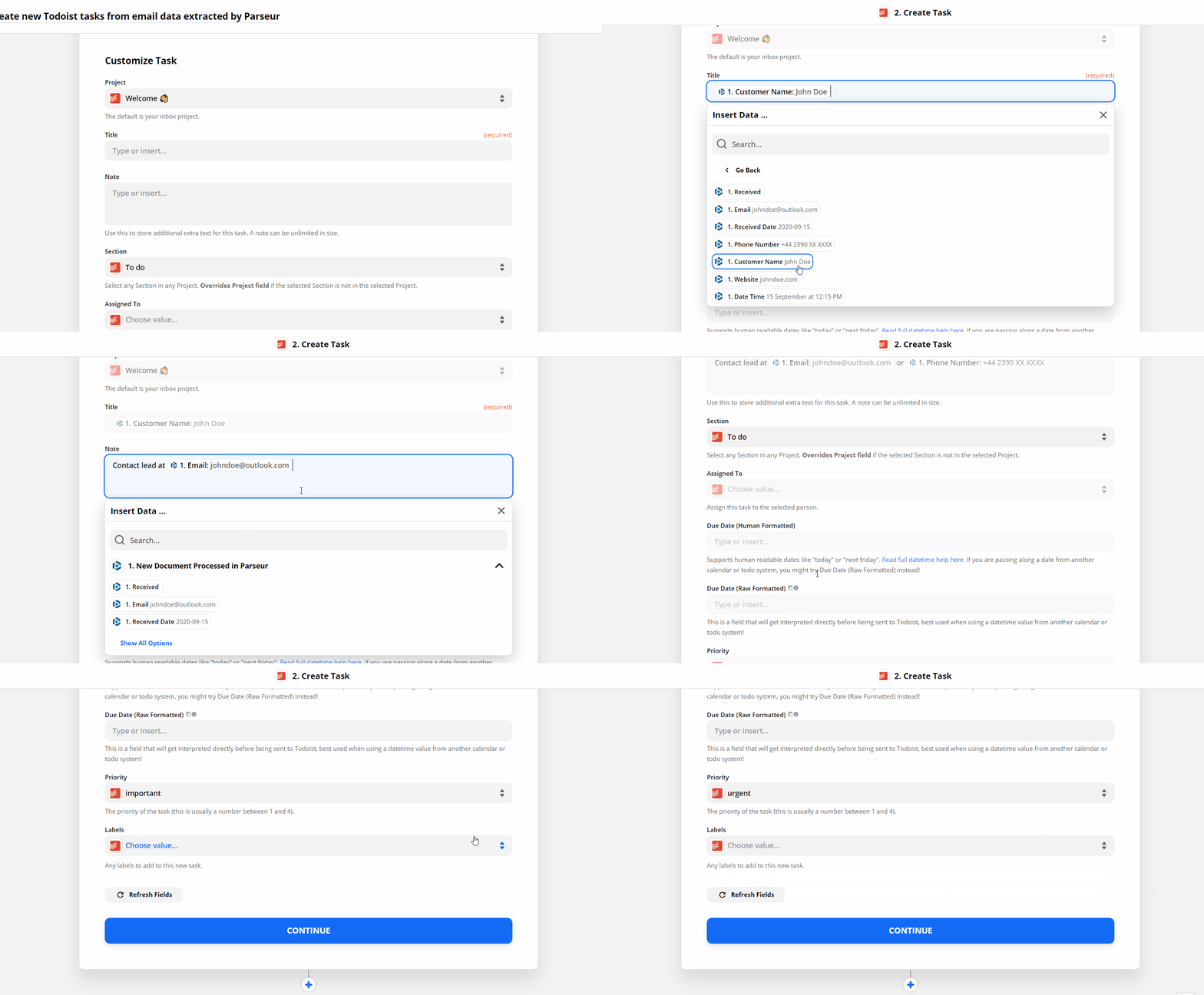
Fill in the data fields and send a test task to Todoist!


Don't forget to turn the Zap on and, your integration will be completed.
Leave the manual data entry process and increase your productivity!