Parseur is a document parsing tool that reads the address out of the email or the PDF it arrived in, splits it into street, city, state, zip and country, and attaches latitude, longitude and a Google Maps link. All of that happens in one pass, while the document is processed, with no separate geocoding API and no address cleaning tool bolted on afterwards.
Key Takeaways
- Addresses come out of the document already split into street, city, state, zip and country. No spreadsheet column required first.
- Latitude, longitude and a map link ride along on every address, so a driver gets a pin instead of a street name.
- Extraction, normalization and geocoding all run inside your document plan. No Maps API key to rotate, no per-lookup meter, no second vendor through procurement.
- What Parseur will not do is certify USPS deliverability. If you need that, normalize here and hand the finished fields to a validation service.
Every address tool starts one step too late
Search for address normalization and every result assumes the same thing: your addresses already sit in a spreadsheet column, waiting to be cleaned. Smarty, Melissa, Loqate, Geocodio and the Google Maps Address Validation API all do excellent work from that starting line.
Nobody's addresses start there. They arrive inside a Zillow lead notification, a Shopify order confirmation, a delivery manifest PDF, a scanned work order. Somebody has to get them out first, and that somebody usually has a spreadsheet open on one monitor and an inbox on the other.
Parseur starts one step earlier. Hand it the document. It finds the address wherever it sits and returns the normalized components with coordinates attached. The cleanup step you were about to go shopping for is already done.
One house, three spellings, three customers
"123 Main St," "123 Main Street" and "Main St #123" are one building. Most systems file them as three. That is how a database ends up with duplicate records, failed deliveries and location data nobody trusts enough to route a driver by.
Parseur does not capture the address as a raw string. It normalizes the components into a standard shape, then enriches them with latitude, longitude and a map link. Readable was never the goal. Usable by the next system down the line was.
We see the same shape across the use cases that bring teams here, whether that is food delivery, real estate lead extraction, mortgage leads or e-commerce: contact details and an address, buried in an email, needed somewhere else within the hour.
Somebody is retyping these right now
Take the coffee shop owner taking orders online. Every order, he copies the delivery address out of the email by hand and passes it to a driver. Now put a dispatch desk in his chair, several hundred order emails and PDF work orders a day, and that same manual step running from open to close. Real estate agents run the loop too, on leads from Zillow, Realtor and Trulia: buyer contact details, plus the location of the property they asked about, street, zip and country.
Senders type an address however they feel like typing it, especially when no form ever checked the entry. A hundred emails a day eats a chunk of somebody's morning. A thousand is somebody's entire job, and it is the part of the job they resent most, particularly when every one of those addresses still has to land in a CRM such as Realvolve, Surefire CRM or an ERP.
You do not need a separate geocoding API
Most teams assume geocoding means wiring up a second service. Google Maps Platform, Smarty, Geocodio, Melissa, Loqate: all capable, all billed by usage, all wanting an API key, a rate limit to watch and a line item to defend at renewal. Google Maps Platform prices its Geocoding and Address Validation APIs per request, which is fine right up until the volume grows.
In Parseur, normalization and coordinates are part of document processing rather than a service you attach to it. They come with your document plan. No key to rotate, nothing metering in the background, no second vendor to put through procurement.
What Parseur does not do is postal validation. It will not certify that a mailpiece is deliverable to a USPS standard, because that is a different job with a different certification behind it. If deliverability certification is a requirement, normalize and geolocate with Parseur, then hand the clean components to a validation service. Routing and CRM matching only ever needed the components.
One email in, nine fields out
Forward a Zillow lead email and the property location comes back split, standardized and pinned to a coordinate:
| Parseur field | Parsed data | Common name for it |
|---|---|---|
| PropertyAddress.normalized | 12345 Random Rd, El Mirage, AZ 85335, USA | full standardized address |
| PropertyAddress.address1 | 12345 Random Rd | street_1 |
| PropertyAddress.city | El Mirage | city |
| PropertyAddress.zip | 85335 | postal_code |
| PropertyAddress.state_code | AZ | state |
| PropertyAddress.country_code | US | country |
| PropertyAddress.lat | 33.1234567 | latitude |
| PropertyAddress.lng | -112.1234567 | longitude |
| PropertyAddress.map | link to Google Maps | map link |
The third column is the one that matters to whoever wires this into your stack. Whatever your CRM, ERP or routing tool calls these fields, the mapping is one to one, so connecting them is a field match instead of a parsing project.
Where this earns its keep
Real estate platforms
Leads from Zillow and Realtor.com arrive as unstructured email. Forward them to Parseur and the property address comes back geolocated, so agents get coordinates pushed to their phone or mapping tool through Zapier, instead of a street name to look up between viewings.
Last-mile delivery and field services
Order confirmations, dispatch requests and PDF work orders all carry whatever the customer typed into the box, and platforms like Shopify pass it through untouched. Parseur standardizes the address before it reaches the routing system. That is the difference between a planned route and a driver calling the office from the wrong street.
Directories and lists
Bulk sources such as business directory listings run the whole address together on one line, no commas, no line breaks, nothing to anchor to. Same treatment, same nine fields out.
Set it once, forget the format
Create a Parseur mailbox and forward the document to it. No template to build, no fields to highlight by hand.

Tell Parseur which fields you want, in plain English, and the AI parsing engine finds them: Text AI for email bodies and text documents, Vision AI for PDFs, scans and images. Set the field format to address and Parseur normalizes and geolocates it automatically on every document that follows.
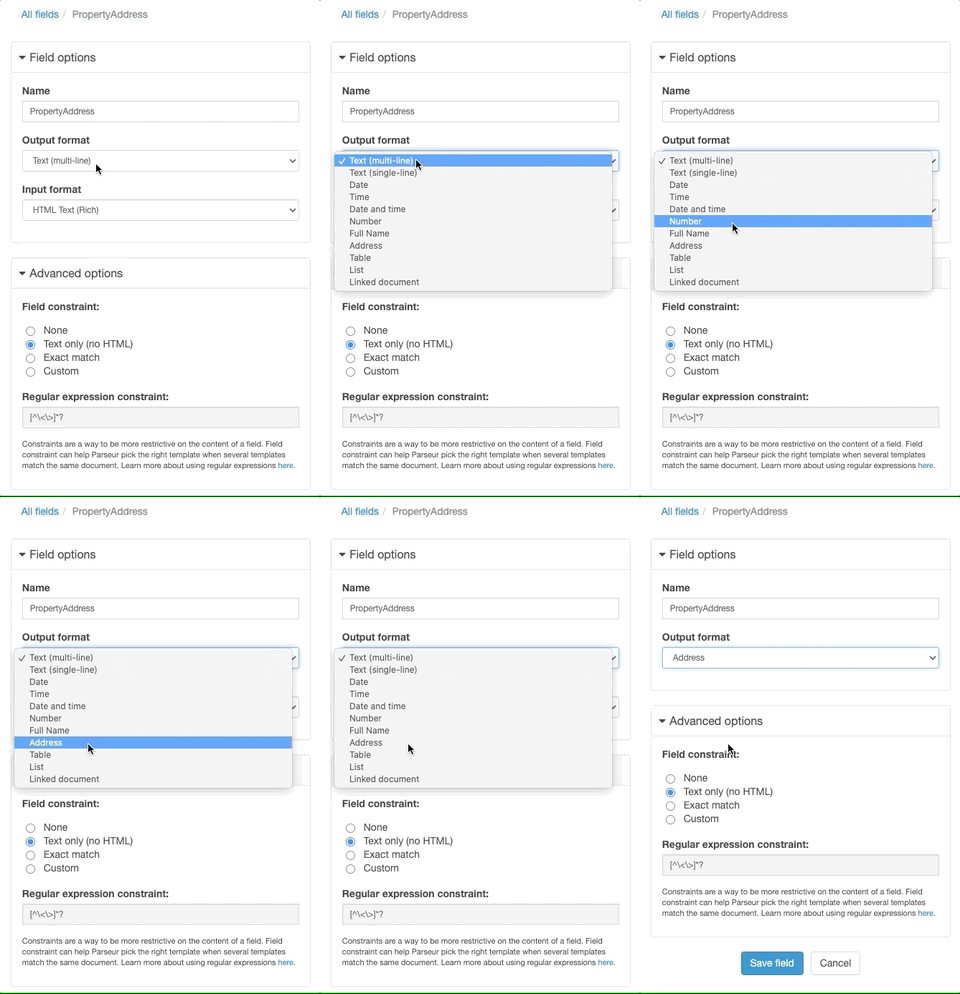
Field formats are how data normalization works across Parseur, on dates and numbers as much as on addresses. Set it once at the mailbox level and everything that arrives after lands in the same shape. Where a wrong address is expensive, switch on the optional human validation step and somebody eyeballs the parsed fields before anything exports.
From there the data goes where you need it: a CRM, a spreadsheet, a route planner, an API. What stops is somebody retyping an address a machine could have read the first time.
Last updated on