
The invitations to bid that matter to you are the ones landing in your inbox, not the ones a general contractor sends out. They come from GCs you bid every year and GCs you have never heard of, most of them relayed through a bid platform, most with a PDF attached and the real deadline buried inside it.
Then somebody retypes all of it into a spreadsheet. Which means your bid log is accurate as of the last time somebody in the office had ten free minutes. That is the part worth automating.
What bid management software does when the invitations arrive by email
Most bid management software assumes somebody already typed the invitation into it. That holds right up until an ITB arrives as a plain email from a GC outside the network, from an owner, or from a project manager's phone. A good share of every estimating inbox looks exactly like that.
Bid management software for the receiving side has to do one thing first: turn an unstructured invitation into fields. Project name, general contractor, bid due date, jobsite, scope. Everything else on a bid board depends on those fields existing.
Every invitation to bid is readable. No two read the same way.
Estimators do not lose invitations because the documents are hard. They lose them because every GC writes one differently, and the difference is never in the same place twice.
There is never just one date
A single invitation to bid routinely carries a pre-bid walkthrough date, an RFI cutoff, the GC's internal deadline and the owner's official bid date. An extraction that returns "the date" will eventually return the wrong one, so each date has to be its own field. A wrong date on the bid calendar is not a data quality complaint, it is a job nobody bid.
The GC's name is not in the From line
When an invitation is relayed by BuildingConnected, PlanHub, Procore or SmartBid, the sending address belongs to the platform. Somewhere in the body or the attachments sits the general contractor you would actually pick up the phone and call, and that is the name your bid log needs.
An addendum looks exactly like a new invitation
Same subject line shape, same attachments, same urgency. Pull the addendum reference out as a field and your board updates the job it already has. Leave it sitting in the prose and your board quietly grows a second copy of the same project.
One job, three desks
Large GCs invite by trade list, plan rooms invite by region, and the same project can land in three estimators' inboxes in one office on one morning. Catching that takes the project identifiers as data, not three people squinting at subject lines and hoping.
The dates that bind are in the attachment
Plenty of invitations put a courteous summary in the email body and the schedule that actually binds in the attached cover sheet. A tool that reads only email text misses them every time, which is why the attachment has to be read as closely as the message it came with.
What is an invitation to bid?
An invitation to bid, or ITB, is a call to contractors to submit a proposal for a specific project, with the details, timelines, specifications and submission process defined up front. It is used when the client already knows what they want, so the contractor prices a defined scope rather than proposing a solution. Most ITBs cover fixed-term contracts with a well-defined scope.
The five steps of the bidding process
- Bid appeal
- Bid submission
- Bid selection
- Subcontracting
- Contract formation
Steps two through five are what your estimating team is paid for. Step one is data entry in a hard hat.
Parseur is not a bid board. It is what fills one.
Parseur does not host plans, send invitations or run a contractor network. It reads incoming documents and hands back structured fields, which puts it in front of whatever you already run on. Three shops where that is the right shape of tool.
You already own a bid board, and it still leaks. BuildingConnected covers the GCs inside the network. It does nothing about the plain email from a GC outside it, from an owner, from an agency, from a PM's personal address. Those are the invitations that go missing, and they are rarely the small ones. Parseur catches them and puts them in the same shape as everything else on the board.
You are two estimators and a Google Sheet. No platform subscription, no annual contract, no reason to sign one. Parseur fills the sheet as the invitations land.
You feed a system you built yourself. Airtable, Smartsheet, Monday, an ERP, a dashboard somebody in the office wired up years ago. Parseur is the front end and the fields go wherever your integration sends them.
The fields worth pulling off every invitation
Build a bid log on these columns and an estimator will trust it.
- Project name and project number
- General contractor, and the estimator contact who sent it
- Bid due date and bid due time
- Pre-bid walkthrough, RFI cutoff and any GC internal deadline
- Jobsite address, normalized to a consistent format
- Scope or trade package
- Addendum reference
- Plan room or document link
- Source email, so anyone can open the original in one click
How to set up bid management automation with Parseur
Three steps. No templates to build, no call with a salesperson. And the only test that counts is your own mail, so try it on the worst invitation you have received this month rather than a tidy one.
Step 1: create an ITB mailbox
Parseur gives the mailbox its own email address. Forward one invitation to it by hand, or set an auto-forwarding rule on your estimating inbox so nothing depends on anyone remembering.
Step 2: let the AI engines read the invitation
Parseur's AI parsing engines extract the fields on their own. The Text AI engine reads email bodies. The Vision AI engine reads PDF, scanned and image attachments, which is where the dates hide. Because the AI reads any layout, thirty GCs with thirty invitation formats do not become thirty templates to maintain.
Confirm the fields you want on the first invitation. Every one after that arrives already filled in.
Step 3: review it, then send it where it belongs
Switch on the optional manual verification step and a person checks the fields before they leave. Most teams look only at the invitations where a date reads as ambiguous, and let the rest go.
From there the data lands in Google Sheets in real time, or in your CRM, ERP or bid board through native Zapier, Make and Power Automate integrations.
Bid documents carry your pricing intent, your client relationships and your scope detail, so where they sit is a fair question to ask any vendor. Parseur is GDPR compliant and SOC 2 Type II compliant, and the report is available on request.
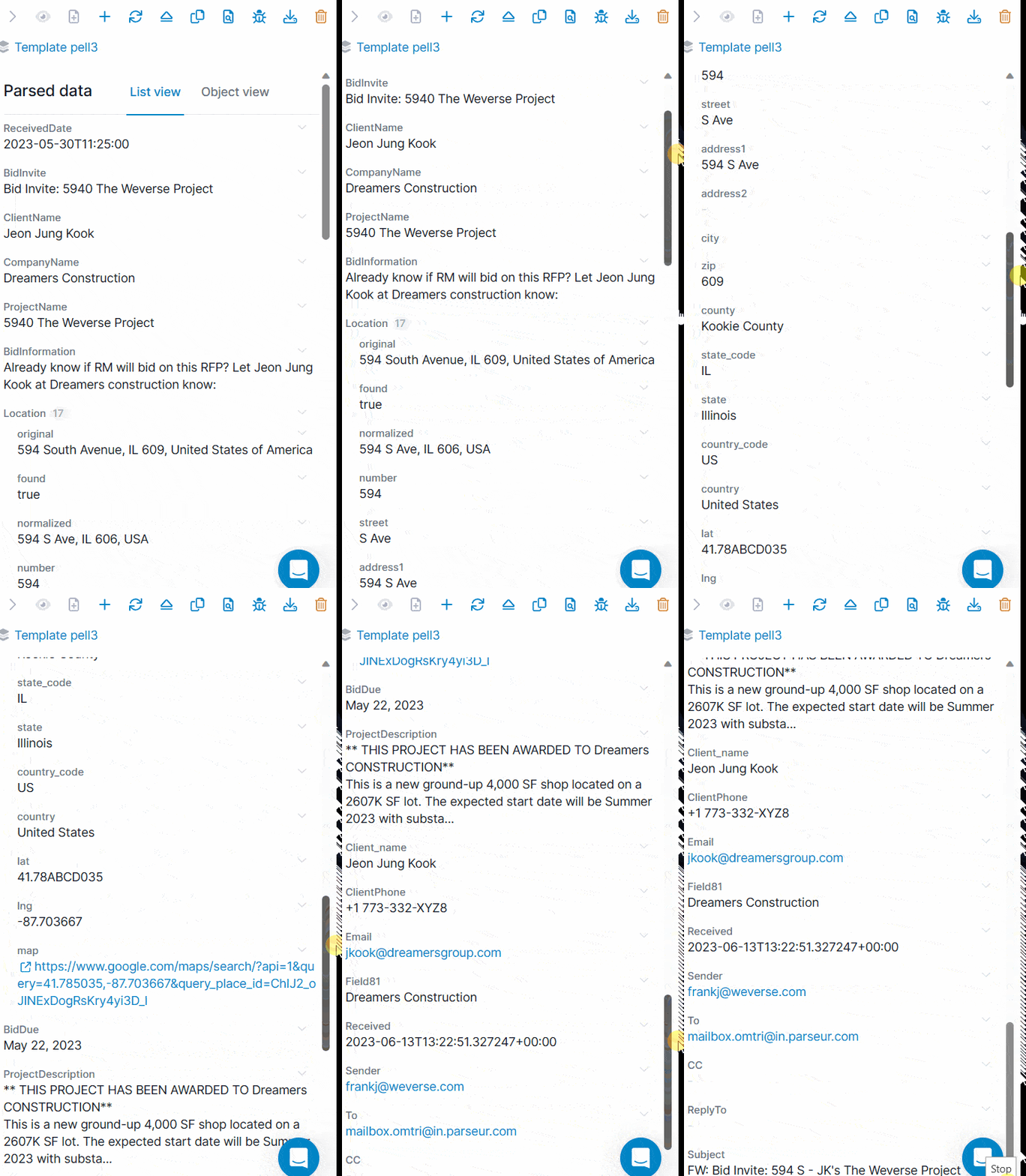
What your estimators do instead
Takeoff, scope review, the phone call that wins the job. None of it happens while somebody is retyping a due date. Manual data entry is also where the errors come from, and a mistyped bid date costs more than a mistyped project name.
Parseur is no-code and starts on a free plan you can run real invitations through, then moves to volume based pricing that follows the pages you process, not the size of your estimating team. If you are still shortlisting, the email parser comparison covers the alternatives. See the full feature set, or take the neighboring problem first with RFP and vendor proposal data or construction invoices.
Bid more, type less
General contractors are not going to standardize their invitations, and your inbox is not going to get quieter. The one variable you control is how much of it a person has to retype. Bid management software that starts at the inbox takes that number close to zero.
Last updated on


