
Blind Screening Rarely Fails on Principle, It Fails on a Tuesday
Ask a recruiting team whether a panel should judge the work instead of the name at the top of the page, and you get a yes every time. Ask how many of them actually do it, and the room goes quiet. Someone has to take the names off, and that someone is a recruiter holding 200 applications and a Tuesday deadline.
The principle is free. The paperwork is not.
What follows is the paperwork. What has to come off a resume, why hand redaction collapses the moment volume arrives, where an AI parser like Parseur belongs in a blind screening workflow, and where it does not belong at all.
Why Recruiters Strip PII From Resumes
Recruiters strip PII from resumes because identifying details move a decision before anyone reaches the experience section. A name, a photo, a ZIP code, a graduation year. None of them tell you whether the person can do the job, and all of them get read first.
- 48% of hiring managers say bias affects their choices (Source: LinkedIn).
- Put a non-Western name on the same resume and the callback rate falls by 50%. That figure comes from a field experiment run across Boston and Chicago and published by the National Bureau of Economic Research in 2003. It is old. It is also still the study everyone reaches for, which is its own kind of finding.
- Companies in the top quartile for ethnic representation on executive teams are 39% more likely to financially outperform those in the bottom quartile (Source: McKinsey, Diversity Matters Even More, 2023). McKinsey reports the same 39% gap for gender representation.
Take the name, the photo and the address off the page. The panel has less to react to and more to read.
Recruiters should integrate AI with human control to improve fairness, guaranteeing that the anonymization process is impartial and accurate. Organizations may find top talent based on merit and establish a more equitable hiring process by utilizing AI-driven solutions. - Jayson Mehra, Managing Director, Enlighten Supply Pool
What GDPR Actually Asks For
The GDPR has no rule that says anonymize resumes. It has data minimization, which says you process only the personal data your stated purpose requires. A hiring manager scoring a technical exercise does not need a home address to grade it.
The headline exposure is 20 million euros or 4% of annual global turnover. The everyday version is smaller and far more instructive. In 2019 the Danish Data Protection Agency recommended a fine of USD 166,215.76 against a taxi company for failing to anonymize user data it no longer had a reason to keep (Source: GDPR Summary). Nobody was hacked. The data simply sat there, named, past its usefulness. A resume archive is the same shape of risk, held in full on the theory that somebody might need it one day.
Manual Redaction Does Not Scale
Every team that tries this by hand hits the same three walls.
- It eats the week. Manually extracting data from resumes is slow work, and redacting them first is slower.
- People miss things. The human element was involved in roughly 60% of breaches analyzed in the Verizon 2025 Data Breach Investigations Report. A redaction process that depends on nobody ever missing a phone number is a process that will leak one.
- It breaks at volume. Fifteen resumes a week is a chore. Four hundred is a headcount request.
One of the biggest challenges in anonymizing résumés is striking the right balance between removing identifiable information and preserving the details necessary for an accurate assessment of a candidate's qualifications. Recruiters often struggle to manually redact names, addresses, and other personal details, but unconscious biases can still emerge through educational backgrounds, employment history, or even certain phrasing. - Lucas Botzen, HR Expert & CEO, Rivermate
Where Parseur Fits, and Where It Does Not
Three paths put anonymized candidates in front of a panel, and only one of them is us. Working out which one you need will save you a procurement cycle.
Your ATS may already do it. Greenhouse, Workable and Pinpoint all ship anonymized screening inside the product. If your panel reviews candidates in the ATS and the feature is sitting there unused, switch it on. Nothing beats a capability you are already paying for.
A redaction tool gives you a redacted document. Anything sold as a resume anonymizer or a resume redactor returns the same resume with the identifying parts covered over. If what your panel needs is an anonymized PDF that still looks like a resume, that is the category to shop in, and Parseur is not in it.
Parseur gives you fields, not a document. You do not get an anonymized resume back from Parseur, today or ever. What you get is structured data: skills, years of experience, job titles, certifications, whatever you asked for, with the identifying fields simply never extracted. That data goes to a spreadsheet, a scorecard, a CRM, a database or your own API. It is the right tool when the panel reviews candidates in a system rather than reading files, when the destination is not your ATS, or when nothing off the shelf covers the workflow you actually run.
Plenty of teams end up using two of the three. Greenhouse covers the panel that reviews inside Greenhouse. Parseur covers the take-home graders, the external interviewers and the comp committee who never log into it. Buy the one that matches how your panel reviews, not the one whose name sounds closest to what you typed into the search box.
How Parseur Reads a Resume
Parseur is an AI parser that turns documents into structured data. To anonymize resumes with AI, nothing gets blacked out. The identifying fields are never extracted in the first place, so there is nothing downstream to leak.
Two engines do the reading. Vision AI handles PDFs, scans and images, Text AI handles emailed and plain-text resumes, and neither one asks you to build a layout template. The two-column design nobody has seen before does not break anything.
You set the field list once. Name, email, phone, address, photo, school, graduation year: each is a field you either extract or leave behind, and what you leave behind never reaches the panel.
The AI reads context rather than matching patterns, so an employer name is recognized as an employer name wherever it sits in the document. That is the difference between this and a find-and-replace that catches "Jennifer" and misses "J. Okonkwo, Lagos".
Our resume parser page covers the full field set, and the resume data extraction page shows what a parsed resume looks like end to end.
When the AI Gets a Field Wrong
Eventually it will, so it is worth knowing what that costs you. Anonymizing by omission changes the failure mode. Because the identifying fields are never extracted, a bad parse shows up as a missing certification or a garbled job title, not as a candidate's name appearing in the panel's spreadsheet. The worst case is an incomplete profile, not a blown blind screen.
Validation is the safety net. Turn it on and a human checks the extracted fields before anything is exported, so a bad parse is corrected in Parseur rather than hunted down later in four downstream tools.
Where the Candidate Data Actually Goes
Resumes land in your Parseur mailbox and stay there in full. Anonymization happens on the way out, in the export, so recruiters keep the original document while the panel only ever receives the fields you sent. Parseur is GDPR compliant and SOC 2 Type II compliant, HIPAA compliance is in progress, and customer documents are never used to train public AI models, which matters rather more than usual when the documents are job applications. The specifics are in our no-training-data policy and our guide to GDPR compliance for document extraction.
Anonymizing Resumes With Parseur, Step by Step
Step 1: Create your mailbox
Sign up and create an AI mailbox to receive resumes. No install, no IT ticket.
Step 2: Send the resumes in
Forward them by email, drag and drop them, or automate it so every resume landing in a cloud drive gets picked up without anyone touching it.
Step 3: Choose what gets extracted
Tell Parseur which fields you want. The AI pulls those and only those out of every resume that arrives, whatever its layout.
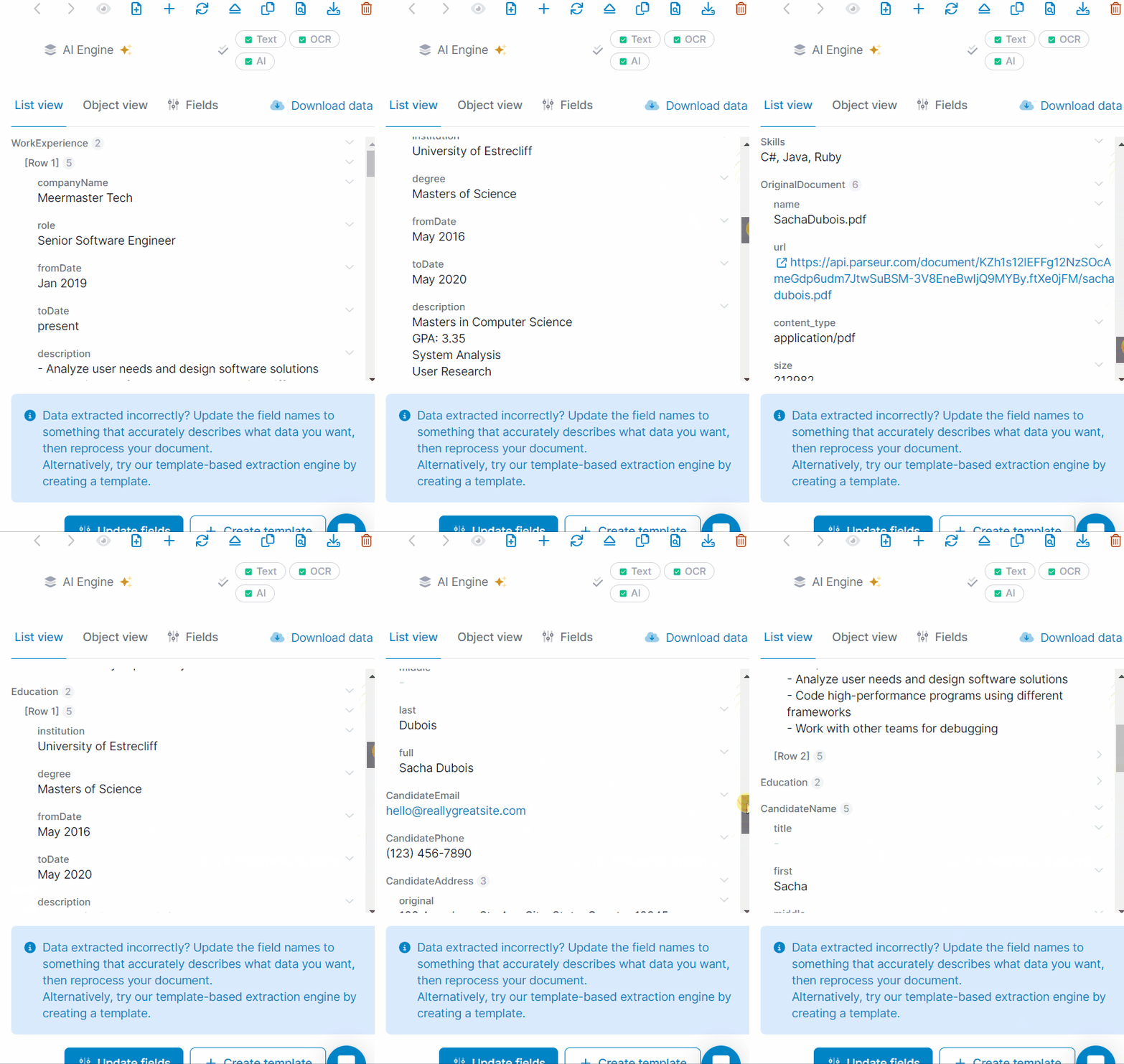
Step 4: Send the anonymized data where the panel reviews
Export the extracted fields wherever the review happens: a spreadsheet, your ATS, Recruit CRM, Workable, Workday, or your own database through the API. If your panel does want a document, push the fields into Google Docs or CraftMyPDF and generate a clean anonymous CV from a template you control.
Set this up once and every resume that arrives afterwards runs through it without a recruiter opening a file. The slow part is not the software. It is getting legal and the hiring managers to agree on which fields the panel is allowed to see.
What Recruiting Teams Get Out of It
Volume stops being the reason blind screening quietly gets dropped in Q4. Hundreds of resumes clear in the time hand redaction took for a dozen, and the rules do not drift with the day of the week. A field is either extracted or it is not, on Friday at five as much as Monday at nine.
You also end up holding a defensible data minimization story: exactly which personal data reached which reviewer, which is the part auditors ask about and the part most teams cannot answer. And when your process changes, the field list changes with it, because you own it instead of filing a request against somebody else's roadmap.
Blind screening only works if one person can run it on a Tuesday morning with 200 applications in the queue. That is the part worth automating.
Last updated on


