
Key takeaways:
- AI can help supply chain operations reduce forecasting errors by up to 50% and can lead to a 65% reduction in lost sales.
- Manually processing delivery notes is time consuming and boring.
- An AI parser, like Parseur helps to automate data extraction from delivery notes efficiently.
Picture this: piles of delivery notes waiting to be processed. Sounds daunting.
It's high time we turn those 'Oh no!' moments into 'Aha!' ones and conquer the world of delivery notes with AI together!
The importance of delivery notes in supply chain and logistics
A delivery note, also known as a dispatch note or a good received note, is an important document accompanying a company's shipment. It acts as a checklist to specify a shipment's contents, which is what separates it from the bill of lading travelling with the same load, a contract of carriage and a document of title. They are the VIPs (very important papers) in the supply chain and logistics world.
What does a delivery note include?
Delivery notes are proof of delivery, and they should include:
- The date of issue
- The date of delivery
- Carrier's name
- Detailed description of the goods
- Load information

Extracting data from delivery notes manually is time consuming
We're in 2024 and the AI era is already upon us. Doing data extraction manually should no longer be part of your work processes. It is time-consuming, boring and repetitive.
Delivery notes do not come in standard formats; they can have different layouts which makes it challenging to retrieve key information from. It can also lead to data entry errors while manually entering data.
Artificial intelligence has shown us that there is always a tool somewhere to automate mundane tasks and here, this tool is called an AI parser.
Processing data from delivery notes with AI
Choosing the right AI parser is like selecting your magic wand. It's more or less the same feeling you get when you are in the Harry Potter shop.
AI can help supply chain operations reduce forecasting errors by up to 50% and can lead to a 65% reduction in lost sales.
Parseur: The best AI parser for delivery notes
Parseur easily identifies key elements like the sender, recipient, and delivery date.
The cool thing about Parseur is that, compared to other AI parsers, you don't need to train the AI model from scratch for it to work properly. Once it receives the delivery notes, data will be processed automatically.
Of course, you can also teach the AI data extraction tool which data to extract and which ones to ignore.
How to process delivery notes automatically?
Create a delivery note mailbox and drag and drop one of the document into the mailbox.

The AI parser will extract data from the delivery note instantly:
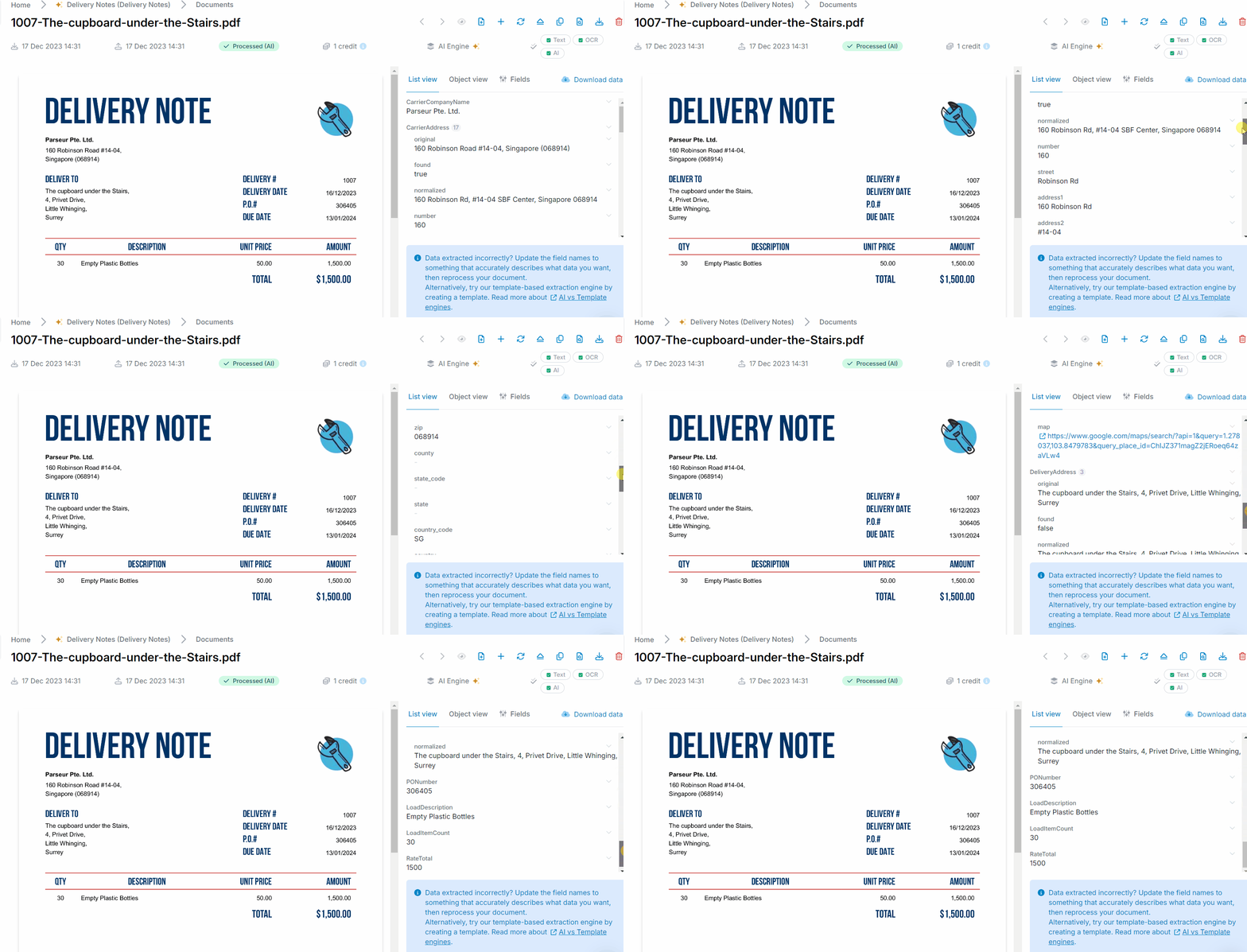
You can also update the fields and teach Parseur which specific information you need.
From now on, each time you send a delivery note to that specific mailbox, the data will be processed automatically.
Brew a potion of data integration
Parseur offers seamless integration with 1500+ applications via Zapier and Make. In this way, you'll be able to create an automated workflow from the moment you have the delivery note to adding that data to another app.
Parseur is super easy and simple to step up and you can try our powerful AI engine through our free plan. Give it a try and let us know how it feels.
Last updated on


