Your storefront runs itself. Your supplier inbox runs on somebody's afternoon.
Behind the checkout button sits a shared mailbox where somebody spends their morning moving PO numbers, ship dates and tracking numbers into NetSuite, QuickBooks and the fulfillment tool. This page is about ending that: e-commerce automation that gets vendor documents into your ERP, accounting and inventory systems with no retyping, no template per supplier and no code. Some people file it under Robotic Process Automation. Your team files it under the thing they do before lunch.
Key Takeaways
- The unautomated half of e-commerce is the vendor side: everything that arrives as an email and an attachment instead of an API call.
- Five document flows carry almost all of the retyping: supplier confirmations, dropship invoices, shipping notices, return requests and payout statements.
- No template per vendor. The AI reads each supplier's layout on its own terms, so a new supplier is a forwarding rule and not a build, and a redesigned invoice does not break the extraction that already worked.
- EDI covers the vendors big enough to support it. Email parsing covers everyone else, which is most of them.
- An emailed order confirmation is a steadier source than a scraped supplier portal, because the email is the record and the portal is only a picture of it.
- Parseur turns vendor emails and attachments into structured fields and pushes them to your ERP, accounting, inventory and fulfillment tools. The account is free, so you can test it on your own vendor documents first.
The Other Inbox
Checkout works. Payments sync. Customers get their confirmation before they close the tab.
Now open the other one. PDF invoices from dropshippers, shipping confirmations from third-party warehouses, inventory updates nobody has read, return requests living as replies inside support threads. Dropshipping models can hit 16-20% return rates, and every one of those returns starts life as a paragraph of free-form email somebody has to turn into an RMA.
The storefront was designed. The back office accumulated. Critical information keeps arriving in formats your ERP, accounting software and inventory database cannot read, so somebody opens each message, finds the four fields that matter and types them in somewhere else.
It is the same gap that runs through retail automation everywhere: the storefront gets the budget, and the paperwork behind it gets a person with a keyboard.
At five orders a day, copy-paste is fine. At five hundred, orders ship late, inventory drifts, invoices pile up, returns go unanswered and the month closes a week behind. None of that is the storefront's fault, and none of it shows up in storefront software.
What Is E-commerce Automation?
E-commerce automation is the automatic movement of data between your store and your operational systems. When an order is placed or a vendor sends an invoice, the information lands where it is needed without a human relay:
- Store to accounting
- Store to ERP
- Vendor to inventory
- Returns to CRM
Shopify, Wix and BigCommerce automate the front end: storefront, checkout, payment. That is the half everyone means when they say the word, and it already works. The other half is operational, and it runs on documents.
Where Parseur fits
Parseur sits between your vendor inbox and your operational systems. Its email parser turns incoming emails and their attachments into structured data and sends it on to your ERP, accounting software, fulfillment platform or database.
Orders, returns, invoices, shipping confirmations and payout notifications all take the same path. Nobody has to open them.
Why not web scraping?
Some stores scrape supplier portals to watch pricing and inventory. On a whiteboard it looks efficient. In production it is a maintenance contract nobody remembers signing. According to AIAPI Alternative, developers spend 25% of their time fixing broken scrapers due to site changes, with companies facing up to $15,000 annually in maintenance costs. Layouts change, sessions expire, and the bot gets blocked on the one morning you needed the number.
Transactional emails are a more reliable source than a supplier's website, because the email is the official record of the transaction and not a rendering of it. An order confirmation carries the order number, SKUs, quantities, totals and tracking links in a consistent structure, and it arrives without anyone having to log in.
The Five Vendor Documents Behind Every Online Store
Almost all of the retyping in an online store comes from five documents. Each one arrives by email, carries a handful of fields somebody moves by hand, and has one obvious destination.
First, the objection that kills most of these projects. You have dozens of suppliers and dozens of layouts, and the last tool you bought wanted a template built for each one, which is why it was dead by the fourth month. Parseur's AI engines read each document on its own terms, so a new supplier is a forwarding rule and not a build, and a vendor who redesigns their invoice does not break what already worked.
Supplier and dropship order confirmations
Your supplier acknowledges the order, sometimes with changes you did not ask for. Fields worth extracting: PO number, supplier name, line items with SKU and quantity, confirmed unit price, confirmed ship date, backorder flags and substitutions. Destination: the PO lines in your ERP.
This is the flow that quietly breaks promises. A confirmed ship date sitting unread in an inbox is a delivery estimate your storefront is still showing customers as fact.
Dropship vendor invoices
PDF attachments, one layout per vendor, arriving all month. Fields worth extracting: invoice number, vendor, invoice and due dates, line items, tax, freight and total. Destination: accounting software or the AP queue in your ERP.
Line items are the whole game. A header total cannot be matched against a purchase order, so a tool that stops at the total has moved the reconciliation work about six inches.
Shipping and tracking notices
Carriers and third-party warehouses send these all day, and behind each one is a customer refreshing an order page. Fields worth extracting: tracking number, carrier, ship date, order reference and package count. Destination: the order record in your store or fulfillment platform. This is the unglamorous core of ecommerce fulfillment automation, and the order status changes when the notice arrives, not when someone reaches the bottom of the inbox.
Return requests
They arrive as replies in a support inbox, not as tickets in a returns system. Fields worth extracting: order number, item and SKU, reason, condition and customer contact details. Destination: your returns tool, to open the RMA and generate the label.
Returns are the highest-friction document in e-commerce because they arrive as free-form messages instead of forms. Extracting the order number, item and reason from the email is what turns a support thread into an RMA record, a shipping label and an inventory adjustment.
Payout notifications
Stripe, PayPal and marketplace payout emails. Fields worth extracting: gross amount, fees, net payout, payout date and the order or batch reference. Destination: Xero, QuickBooks or your ERP, for three-way matching against the order and the bank deposit. Miss one and accounting, reporting and cash position drift together, and it surfaces a month later, in a meeting.
Which E-commerce Automation Software Do You Actually Need?
Search "ecommerce automation software" and you get six product categories solving six different problems. Buying the wrong one is the usual reason an automation project dies quietly a couple of months in.
| Category | What it does | Use it when |
|---|---|---|
| Storefront automation (Shopify Flow, platform rules) | Triggers actions inside your store | The data already lives in your store |
| Email and document parsing (Parseur) | Turns vendor emails and attachments into structured fields | The data arrives as email, PDF, or spreadsheet |
| AP automation (Bill, Tipalti, Stampli) | Captures, codes, approves, and pays invoices | Your bottleneck is the approval and payment workflow, not capture |
| iPaaS (Zapier, Make, n8n) | Moves data between systems | You have clean data and need it somewhere else |
| EDI networks (SPS Commerce, TrueCommerce) | Exchanges standard transaction sets with trading partners | Your vendor is large enough to support EDI |
| Returns platforms (Loop, Narvar) | Manages the customer-facing returns flow | Customers should file returns in a portal, not by email |
Most stores end up owning two or three. The pairing that removes the most manual work is a parser feeding an integration platform, because almost all ecommerce automation tools assume you arrive with clean structured data already in hand. Something upstream has to make it.
EDI or email parsing?
EDI and email parsing solve the same problem for different vendors. EDI defines standard transaction sets for these exact documents: 850 for the purchase order, 855 for the order acknowledgment, 856 for the advance ship notice, 810 for the invoice, and 846 for inventory. Where it is available, it is the cleaner integration.
It is available less often than the architecture diagram suggests. EDI requires the vendor to implement it too, and small suppliers, regional distributors and most dropship partners never will. Email parsing covers that long tail, and most operations end up running both without any trouble.
E-commerce Automation vs. Dropshipping Automation
These two terms get used in the same sentence as if they were the same size. They are not. E-commerce automation covers the whole operation, from orders and inventory to accounting, returns and ERP workflows. Dropshipping automation covers one slice of it, the supplier coordination. Shopping for the second when what you needed was the first is how you end up owning a tool that only talks to suppliers.

E-commerce Automation:
- Automates your entire online business, from orders to CRM.
- Covers orders, inventory, accounting, returns, and ERP workflows.
- Works for any fulfillment model, including warehouse, in-house, and dropshipping.
- Flow: Store to Warehouse to Accounting to ERP.
- Provides broad operational automation across your business.
Dropshipping Automation:
- Automates supplier-side workflows specifically.
- Focuses on forwarding orders to suppliers and tracking shipments.
- Only relevant to third-party fulfillment models.
- Flow: Store to Supplier to Shipping to Inventory.
- Provides vendor communication automation rather than full operations.
Bottom line: Dropshipping automation is just one piece of the larger e-commerce automation puzzle.
Competitor and Price Monitoring
Competitor price alerts arrive by email too. Parseur pulls the product, the competitor and the price out of those alerts and pushes them to your dashboard or pricing engine, so repricing runs on this morning's numbers instead of last week's spreadsheet.
How to Automate Your E-commerce Emails With Parseur
Four steps, and no template building. The Text AI engine reads email bodies. The Vision AI engine reads PDFs, scans and images. The fields come out of the first document you send it.
Step 1: Create a free Parseur account
If you do not have one already, sign up here and create your account. The account is free, so you can run your worst supplier PDF through it before anyone starts talking about contracts.
Step 2: Create your e-commerce mailbox
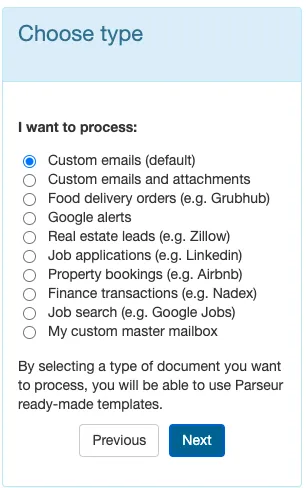
Name the mailbox after the flow it handles, such as orders, invoices, shipping, or returns. Select Custom emails and attachments and click Next.
Step 3: Forward your vendor emails
Copy the mailbox address and forward one supplier confirmation or vendor invoice to it. For production, set up automatic forwarding from your email client (Gmail, Outlook, or your provider's admin console) rather than from a phone or desktop app.

Parseur typically extracts the following from an order document:
- Shop name and order date
- Customer name, email, phone, delivery and billing addresses
- Expected delivery date
- Line items, each with reference, SKU, quantity, description, and unit price
- Subtotal, delivery fees, tax (GST or VAT), and total
- Payment method and payment status
The AI engine finds these fields on its own. You confirm them once, and every email with a similar structure is handled the same way from then on. When the AI is unsure about a document, an optional human validation step holds it for a person to check before it exports, so a wrong quantity gets caught at intake instead of in a shipment.
Step 4: Send the data where it belongs
Head to the Export section of your mailbox and pick the destination.

Export by webhook or API for a direct ERP connection, or through Zapier, Make, or n8n to reach accounting tools like Xero, fulfillment platforms, and order management systems. Shopify stores can push parsed order and vendor data straight back into the store. That is what ecommerce ERP integration looks like in practice: a destination you pick off a list, not a project you staff.
Vendor documents carry your costs, your margins and your customers' addresses, so where they get processed matters. Parseur is GDPR compliant and SOC 2 Type II compliant, and the report is available on request.
Online stores run these exact flows through Parseur every day. You can read reviews from our customers.
Fast, simple, reliable, cost-effective
- Pearce Services
The Half of Your Store Nobody Sold You Software For
Platform vendors automated the customer experience and did it well. The operational layer behind it still runs on email, attachments and somebody's undivided attention.
The data in those messages is good data. It is just locked inside prose. Get it out, route it to the system that needs it, and the work does not get faster. It stops existing.
Nobody joined an online store to retype ship dates.
Last updated on