Key Takeaways
- Utility bill data extraction turns electricity, gas, water and telecom bills into one spreadsheet row each, with nothing retyped and nothing waiting for month end.
- Usage arrives with its unit attached. kWh, therms, CCF, gallons and gigabytes land in their own columns, next to the meter number, service period and rate.
- Those usage columns are what scope 2 reporting runs on, which is how the team that pays the bills ends up owning the emissions number too.
- No template per provider. The US alone has close to 3,000 electric utilities, so a template-per-layout approach is a project that never finishes.
- Manual data extraction is the expensive option: industry benchmarks put the average invoice at $9.40 to process by hand.
- Parseur reads the bills you already receive. It does not log in to provider portals and it does not audit your charges. It hands clean data to whatever does.
- Getting started is a mailbox and one sample bill, not a procurement cycle. Parseur is GDPR and SOC 2 Type II compliant, and your documents are never used to train AI models.
Forty sites. Four utility types. Two thousand bills a month, arriving as email attachments, portal downloads and a photo somebody took of a paper bill in a depot. At the end of that pipeline sits one person, one keyboard and the last week of every month.
Then somebody asks for scope 2 numbers, and the same pile of paper has to produce usage as well as payments.
The fix is not a bigger team. It is data extraction that reads every one of those layouts and hands back a spreadsheet with the kWh already in a column.
What utility bill data extraction is
Utility bill data extraction is the process of reading electricity, gas, water and telecom bills and returning their contents as structured fields, so each bill becomes a row of data instead of a document somebody has to open. The output is account number, meter number, service period, usage with its unit, charges and total due, in columns, ready for a spreadsheet, an ERP or an energy management platform.
That is a different job from paying the bill, and a different job from analyzing it. Extraction is the step that has to happen before either of those is possible.
Utility bills break the tools that read invoices
Utility bills are one of the hardest document types to automate, because the same four fields sit in a different place on every provider's layout. The US Energy Information Administration counts close to 3,000 electric distribution utilities operating in the United States, and the Environmental Protection Agency counts over 148,000 public water systems. Add gas, internet and phone providers, then add the fact that any of them can redesign a bill without telling you.
Now count the layouts a template-based tool would need. That is the arithmetic that kills these projects.
Parseur's AI engines read the document rather than a map of it. The Text AI engine takes emails and text documents. The Vision AI engine takes PDFs, scans and images. Neither needs a template built per provider, which is what separates this from classic utility bill OCR, a tool that reads a bill into text and then leaves you to go find the fields in it. When a provider redesigns its bill, the same fields keep arriving, which is the only way utility bill parsing survives contact with a real portfolio.
Types of utility bills we see most:
- Electricity bills, where kWh usage, demand and rate matter as much as the total
- Water bills, billed in gallons, cubic meters or CCF depending on which municipality you are in
- Gas bills and their therms or CCF
- Internet and phone bills, on which the line items outnumber everything else
Not sure which of your invoices count? Our guide on what a utility bill is covers every type. And before you commit to any tool, read what actually breaks in utility bill processing once a few thousand bills a month are running through it.
What every hand-keyed bill costs you
Ardent Partners' 2025 accounts payable benchmarks, reported by WEX, put the average cost of processing a single invoice at $9.40, against $2.78 for best-in-class teams, and the average processing time at 9.2 days. Utility bills are the worst possible candidate for the expensive end of that range. They are low value, high frequency, and they arrive on a schedule you do not control.
The cost is not only money. A transposed meter reading stays a monthly risk until an intelligent document processing tool takes the typing away. Bills land together at month end and the accounting team absorbs the spike, every month, forever. And a bill that takes nine days to key is a bill whose usage figure is stale by the time anyone charts it, which stops being a nuisance the moment that figure has to appear in an ESG report.
We keep the full numbers, and how vendors present them, in our AI invoice processing benchmarks.
Parseur, the utility bill parser with no templates to keep alive
Parseur is the key to automating data extraction from utility bills.
It reads handwritten text and scanned characters, turns unstructured data into clean fields, and sends them wherever you work. No template per provider, no phone call before you can see it run on one of your own bills.
Your documents stay yours. Parseur is GDPR compliant and SOC 2 Type II compliant, and nothing you send through it is used to train AI models.
The fields Parseur pulls off a utility bill
Parseur returns each utility bill as a set of named fields with their units attached.
| Field group | What comes back |
|---|---|
| Provider | Utility company, utility type, statement or invoice number |
| Account | Account number, customer name, service address, billing address, phone number |
| Period | Service period start, service period end, bill date, due date |
| Meter | Meter number, previous read, current read, read type |
| Usage | Value plus unit. kWh and demand kW for electricity, therms or CCF for gas, gallons or cubic meters for water, GB or minutes for telecom |
| Money | Rate or tariff, line items, taxes and duties including GST or VAT, previous balance, total amount due |
You can also list the fields you need and Parseur extracts those instead, which is the difference between a utility bill data extractor you configure once and one you rebuild every quarter. Anything the engine is not confident about goes to validation rather than into your spreadsheet as a guess.
Volume is not where this breaks. Bills are read in seconds each, so two thousand a month is a queue that drains rather than a backlog that grows.
What setting this up actually takes
No template, no field mapping per provider, no ticket with IT.
Create a mailbox and send it bills
Create an account on Parseur and choose the mailbox Utility Bills.

Upload the bills to the mailbox, or forward them to the given email address. Parseur takes them in whatever format they arrived in.
AI data extraction that needs no template
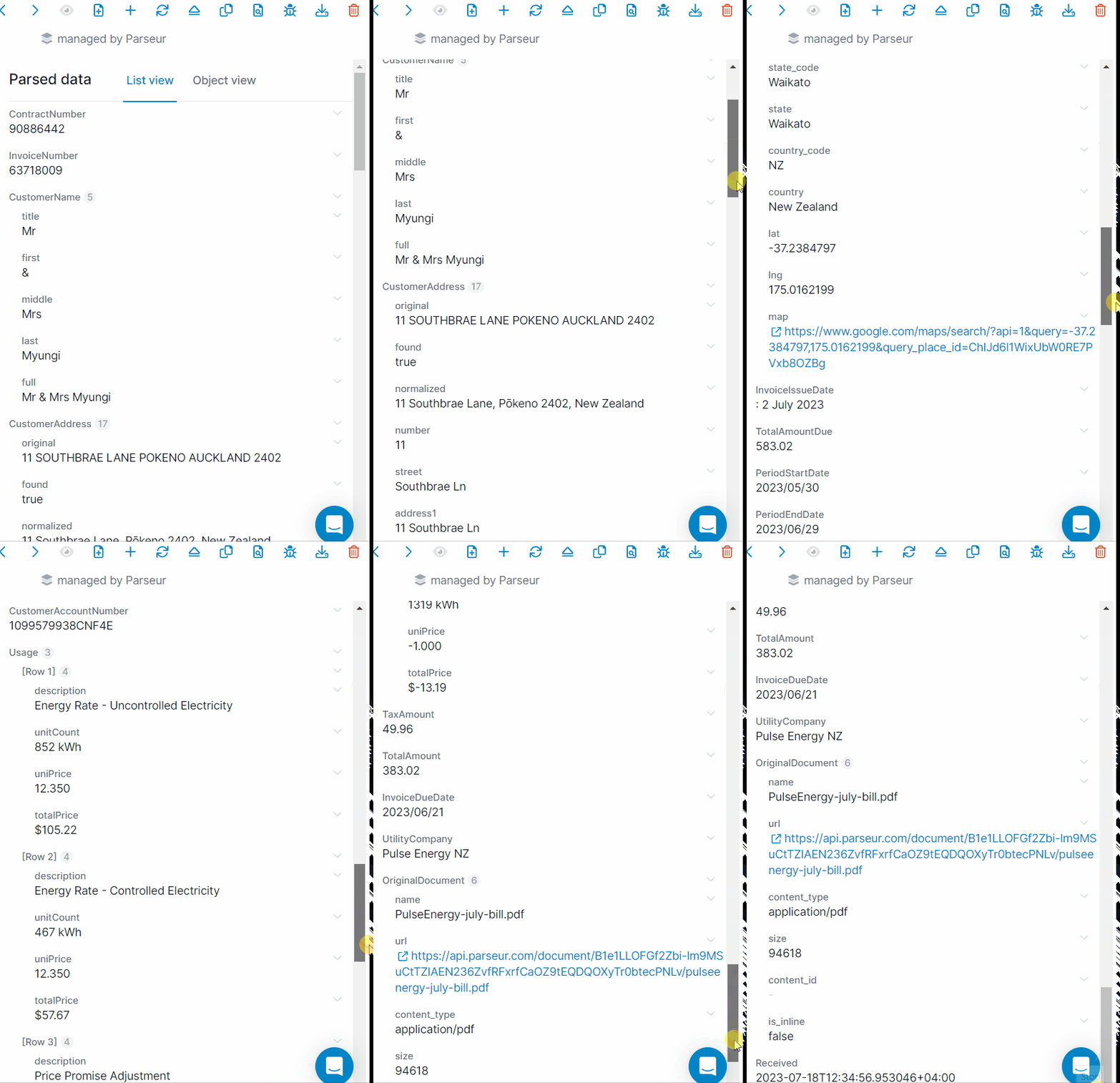
Parseur already has a pre-defined mailbox to process utility bills automatically. The AI engine recognizes the document type and extracts the data fields from it instantly, with no template to build first.
Send utility bill data to Google Sheets or Zoho in real time
Parseur offers seamless integrations with other apps via Zapier, Power Automate or Make.
I found Parseur to be an excellent tool. I am integrating this with Azure Logic apps for automation of bill approvals and my experience was seamless. In comparison with other tools such as mailparser.io and parserr, I can safely say parseur is cleaner, more intuitive and developer friendly
- Shyam B., Novac Technology
What happens once every bill is a row
Extraction is the boring half that makes the interesting half possible. The same rows feed:
- Spreadsheets first, via Google Sheets or Excel, because that is where most cost per unit comparisons still live
- A coded, approved bill sitting in your AP workflow, payable without anyone opening the PDF
- Consumption by site and period, which is the input your scope 2 figures have been waiting on
- Consolidated bills split back across sites, departments or tenants
Parseur does not audit your charges or hunt for overcharges. It puts the numbers in a shape where you finally can.
Take back the last week of the month
Utility bills will keep arriving. That part is not negotiable. Whether a person on your team spends the last week of every month turning them into a spreadsheet by hand is.
Send one of your own bills through and see what comes back, before you talk to anybody here. The rest of the decision makes itself.
Last updated on