Key Takeaways
- Utility bill OCR is the automatic capture of structured data from electricity, gas, water, and telecom bills using optical character recognition combined with AI, returning named fields instead of raw text.
- The fields that matter are not the invoice fields. Meter number, meter readings, consumption with its unit, demand in kW, tariff, and the split between supply and delivery charges are what separate utility bill OCR from generic invoice OCR.
- Every commodity behaves differently. Electricity carries demand and time-of-use, gas carries therms or CCF and a heating value, water carries meter reads and sewer charges, telecom carries a repeating table of lines.
- Manual entry runs 8 to 12 minutes and $1 to $3 per bill with a 1 to 5% error rate. At a few thousand bills a month, that is a full-time job nobody wanted.
- Template-free AI extraction handles new providers and redesigned layouts with no setup, which is the whole problem at portfolio scale.
What is utility bill OCR?
Utility bill OCR is the automatic capture of structured data from an electricity, gas, water, or telecom bill, using optical character recognition combined with AI to return named fields rather than a page of loose text. Plain OCR reads the page and hands back text. AI OCR reads the page and hands back fields, which is the part that matters, because no accounting system has ever wanted a wall of text.
Bills show up as PDFs, scans, and email attachments, and no two providers agree on where anything goes. One prints the meter reading in a sidebar. The next buries it in a table on page three. A third splits supply and delivery across two pages and considers that a courtesy. A person absorbs all of it in about a second. A template falls over.
One bill a month, none of this matters. Four hundred sites, and it is a data pipeline with a person wedged in the middle of it.
What fields can you extract from a utility bill?
All of them. The better question is which ones to ask for, because the fields that make a utility bill a utility bill never appear on an invoice.
| Group | Fields |
|---|---|
| Account and service | Account number, customer or account holder name, service address, billing address, utility provider, meter number or device ID |
| Billing period | Bill date, due date, service period from and to, invoice or statement number, previous balance, current charges |
| Usage and charges | Current and previous meter reading, read date, consumption with unit (kWh, therms, CCF, gallons, MMBtu), demand in kW, unit rate, tariff or rate plan, supply versus delivery charges, line item descriptions, taxes, fees and surcharges, credits and adjustments |
| Payment | Total amount due, payment methods, late payment fees, reference numbers |
Row three is where the money hides. Account number and total due tell accounts payable what to pay. Meter reading, consumption, demand, and tariff tell operations whether the bill was right in the first place, which site is drifting, and what the ESG report is about to say. A generic invoice tool reads the top two rows and stops. A utility bill parser keeps going.

Electricity, gas, water and telecom are four different problems
Treating all four the same is the most common way a utility bill parsing project ends up half-useful. The shared fields are shared. The interesting ones are not.
Electricity. Consumption in kWh, plus a peak demand figure in kW that often costs more than the energy itself. Time-of-use tariffs split usage across peak, off-peak, and shoulder bands. In deregulated markets the supply charge and the delivery charge come from two different companies on one piece of paper, and only one of them is negotiable.
Gas. Volume in therms, CCF, or MMBtu depending on the region, usually with a conversion factor printed somewhere on the bill that you need if you report in energy units. Seasonal swings are big enough that year-over-year is the only comparison that tells you anything.
Water. Meter readings do most of the work here. Sewer charges are frequently calculated from water volume rather than measured, and irrigation is sometimes metered separately. A spike means a leak, and finding it in the data beats finding it in the ground.
Telecom. Not really one bill. It is a table of lines, numbers, or circuits, each with a plan charge, usage, overage, and taxes. Flatten that into a single total and you have thrown away the only data that would have shown you the twelve phones nobody has used since 2024.
What data entry from utility bills actually costs
It never appears as a line item, which is exactly why it survives. Here is what the research puts on it.
- Time per bill: 8 to 12 minutes of hands-on keying, depending on complexity, according to Resolve. The wider invoice workflow around it runs much longer.
- Cost per bill: $1 to $3 in direct data-entry labor for simple entry, per ERP Software Blog. Add approvals, matching, and exceptions and it climbs from there.
- Error rates: commonly 1 to 5% on structured entries, and higher on complex multi-field documents, according to Fluxygen. A few percent of your billing data is quietly wrong, and nothing in a manual process is designed to find it.
- What automation changes: up to roughly 80% time savings against manual methods across invoice and bill workflows, as reported by Ramp.
- Accuracy you can expect: Gartner reports 90 to 99% extraction accuracy for document parsing, depending on document quality and whether human validation is applied.
Run those numbers against 3,000 bills a month and the arithmetic gets uncomfortable fast. Between 400 and 600 hours of keying, which is two people who could be doing something else. And 30 to 150 bills a month carrying an error that surfaces at quarter close, if it surfaces at all.
Why utility bills are harder than invoices

Four things separate a utility bill from a supplier invoice. Every provider designs its own bill and then redesigns it, so four commodities across dozens of providers is a target that moves on somebody else's schedule. A good share of those bills arrive as a phone photo of a piece of paper, shot at an angle in bad light, which is unstructured data at its least cooperative and the exact point where template matching gives up.
Then there is what the numbers get used for. A utility bill doubles as proof of address and as a record for tax and ESG reporting, so wrong numbers travel. And at a few thousand bills a month, a 2% error rate is not a rounding difference. It is a monthly incident.
How to extract data from utility bills without a single template
Parseur is a template-free AI parser built for document data extraction at volume. Bills arrive at a dedicated mailbox, through the API, or from a watched folder. The Vision AI engine reads PDFs, scans, and photographs. The Text AI engine reads emailed and text bills. Both arrive pre-trained, so a provider you have never processed before needs no setup at all.
You list the fields you want once. Every bill after that maps to them, whatever layout it turns up in.
- No templates. A redesigned bill breaks nothing, because there was no layout to break in the first place.
- Any commodity. Electricity, gas, water, telecom, and whatever else the portfolio has picked up along the way.
- Tables stay tables. Line-level telecom charges come out as rows you can allocate, not one flattened total.
It runs at thousands of bills a day, parsed on arrival. It is GDPR-compliant, which is not a small detail when every document you feed it carries somebody's name, home address, and account number.
None of that is the test, though. The test is your own mail. Take the worst bill in the folder, the crumpled scan from the provider that changed its layout in March, and run that one first. Every tool on your shortlist demos beautifully on a clean PDF.
Do I need to train the AI model?
No. Not a training set, not a folder of labelled sample bills, not a weekend spent teaching software what a meter reading looks like.
Parseur is an AI document extraction engine that arrives pre-trained, and adding your hundredth provider takes the same amount of work as adding your first, which is none.
Create a mailbox, point the bills at it, and the AI engine converts the unstructured document into structured data on arrival.
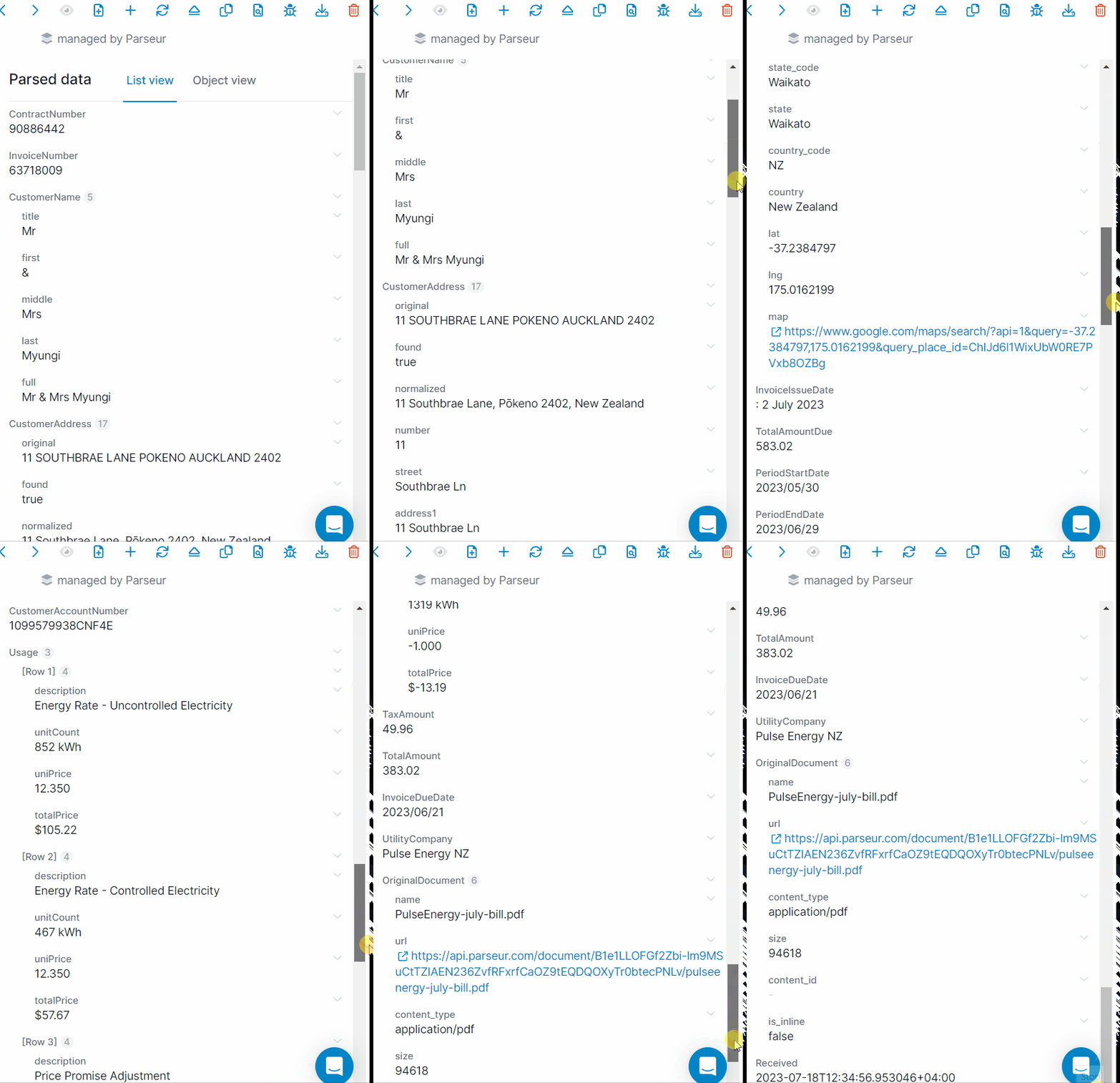
Where the fields end up
Wherever you need them. Excel and Google Sheets for analysis, accounting and ERP systems for payment, energy and ESG platforms for reporting, and everything else through Zapier, Make, n8n, or a plain webhook. Each bill is delivered the moment it is parsed, so nothing waits for a monthly export.
For the full workflow, see extracting data from utility bills with AI, or the utility bill extraction solution page for what it looks like across a portfolio.
Your bill volume is already costing you something. The only question is whether it shows up anywhere.
Put your own volume through the cost simulator
Last updated on