Key Takeaways
- Automating property booking management means lifting the reservation fields out of every confirmation email and writing them into your spreadsheet, PMS, accounting tool or CRM with nobody retyping anything. Parseur is an AI email parser that does this for booking confirmations from any channel.
- Bookings reach you through more channels than any API connects to: your own booking engine, returning guests, corporate travel desks, agency partners, regional platforms and PDF vouchers. All of them land in one mailbox and come out in one set of columns.
- No template per platform. Parseur's AI reads the meaning of an email rather than the position of the text, so a redesigned confirmation and a platform you added this morning both work untouched.
- Alterations and cancellations parse like any other booking email. Keyed on the reservation code, a change updates the booking it belongs to instead of creating a duplicate.
- Setup is one mailbox and one forwarding rule. Pricing is published and metered on pages processed per month, the free plan includes 20 pages with every feature on, and you can run your own bookings through it before you pay for anything.
Your PMS connects to some of your channels. Bookings arrive through all of them.
Airbnb sends one email. Booking.com sends a different one, your own site sends a third, a relocation agency forwards a PDF voucher, and the guest who stayed last summer just writes to you. The same handful of facts every time, flattened into sentences for a person to read. So a person reads them, types them into the spreadsheet, types them again into the PMS, and types them a third time into the books.
Add a channel and you add to that person's afternoon. That is how a growth decision quietly becomes a hiring decision.
Parseur is an AI email parsing tool that reads all of it. Forward a confirmation from any channel and the guest name, dates, property, reservation code and payout come back as one row, in one format, in the sheet or the system you already work in.
What is a property bookings mailbox?
A property bookings mailbox is a Parseur inbox configured to read reservation confirmations and return them as structured data. You forward your booking emails to its dedicated address, Parseur extracts the fields you named, and the result goes to a spreadsheet, a PMS, an accounting tool, or your own system over an API.
It is one of Parseur's predefined mailboxes, which means the booking fields most operators want are already configured when you create it. Automating property booking management, in practice, is that mailbox plus one forwarding rule.
Every channel a booking can reach you on
Reservation software connects to a list. Your inbox connects to everyone, which is why it ends up holding whatever the list left out.
Keep the integrations you have. Hostaway, Guesty, Hospitable and OwnerRez sync the big OTAs properly, and on those platforms an API beats an email every time. The question is how much of your booking traffic that actually covers:
- Direct bookings from your own site. The channel you pay no commission on is the one nobody built an integration for.
- Returning guests who just email you. Your best booking of the year, arriving as a sentence in a message.
- Corporate travel desks and relocation agencies, which confirm by email with the reservation attached as a voucher.
- Regional and niche platforms outside your PMS tier's connection list, including the local site that fills your shoulder season.
- Agency and partner confirmations. Forwarded on by a person, not synced by a machine.
- Payout and remittance notices, saying what actually hit the bank, on what date, after which fees.
- Alterations and cancellations. These land in your inbox before they finish propagating anywhere else.
One mailbox reads all of it and returns one set of columns. That is the difference between a booking calendar that reflects your integrations and one that reflects your business.
Booking platforms Parseur reads
Parseur reads booking emails from short-term rental, vacation rental and hotel platforms. The ones operators ask about most:
- Airbnb, in English, French, German, Italian and Spanish
- Booking.com
- Vrbo, vacation rentals by owner
- Beds24, Duve, Eviivo, Guesty and MyAllocator
- Priceline and TripAdvisor Rentals
That is a list of frequently asked questions, not a list of limits. Parseur reads the meaning of a booking email rather than a sender it recognizes, so a platform nobody in this office has heard of works on its first try.
What Parseur extracts from a property booking
You name the fields once and every platform returns the same ones:
- Guest name, split into first and last
- Check-in and check-out dates, normalized to a single format
- Number of guests
- Property or listing name, plus your own internal property code
- Reservation or confirmation ID, which is the key you dedupe on
- Payout amount, total charged, platform fees and taxes
- Booking status, so a cancellation shows up as one
- Guest contact details where the platform shares them
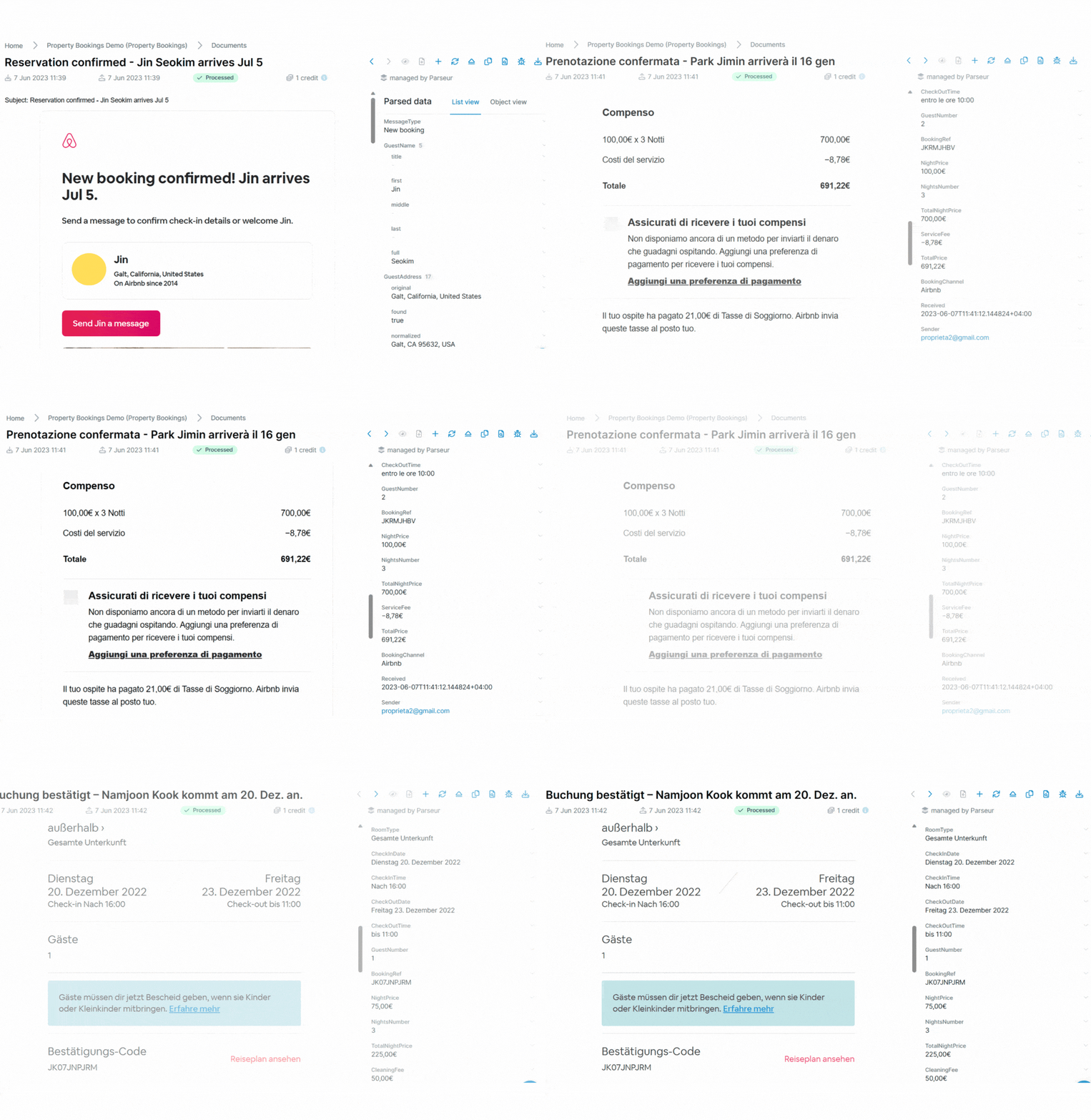
Anything else you need, you add. A cleaning fee broken out for the bookkeeper. An internal property code your PMS insists on. The channel a booking came in on, so you can finally see the mix. Name the field once and it arrives on every booking after that.
The second and third email about the same booking
A confirmation is the start of a reservation, not the whole of it. Guests move dates, add a night, drop a guest, or cancel three days out, and each of those arrives as its own email.
Parseur reads them the same way, returning the updated dates, guest count or amount along with the reservation code. Match on that code and never on guest name plus dates, and the alteration lands on the row that already exists. A cancellation flips a status rather than leaving a ghost reservation blocking a calendar nobody has reconciled.
Every tool demos well on a clean confirmation. Month three is decided by the third email about the same stay.
How to automate property booking management in three steps
No code, no template to build, and nothing waiting on a sales call.
Step 1: Create a property bookings mailbox
Sign up and create a mailbox, choosing the property bookings type. Send it one of your existing confirmations, then set an auto-forwarding rule from your inbox so every new booking arrives on its own. That is the whole of setup: one mailbox, and one forwarding rule for each inbox bookings currently land in.


Step 2: Parseur reads whatever arrives
Parseur's AI engines go to work the moment the email lands. The Text AI engine handles email bodies, the Vision AI engine handles PDF vouchers, scans and photos.
There is no template per platform. None to create, none to maintain, none to fix. A regional site's first email arrives in the columns you built for Airbnb, and the morning Booking.com ships a redesigned confirmation, nothing on your side moves.
Accuracy runs up to 99.9%, which in practice means you give the first day's output a hard look and then stop looking. For a permanent second pair of eyes, switch on the optional human validation step and approve fields before they export, which keeps a misread payout out of your accounts. Guest names and payment amounts also make you the data controller for that inbox, so it is worth knowing that Parseur is GDPR compliant and SOC 2 Type II compliant, with the audit report available on request.
Step 3: Send the booking data where the work happens
- Keep a live reservation list in Google Sheets
- Download to JSON, CSV or Excel
- Route through Zapier, Make or Power Automate into a PMS, CRM, calendar or cleaning board
- Post straight to your own system over API or webhook
- Send payout and fee lines to Xero or QuickBooks so OTA reports and bank deposits reconcile against each other
Start on the free plan, 20 pages a month with every feature switched on, then move up a tier as the portfolio does. Every price is on the page, which is more than most parsing software will show you.
Why the volume only goes one way
Platform booking is not a trend to get ahead of. It is how the market already works, and every stay it produces generates a confirmation, usually a payment notice, and often an alteration.
Guests spent 144.3 million nights in short-term rental accommodation in the EU between January and March 2026, booked through Airbnb, Booking or Expedia, up 9.7% year on year. Europe is not your market, but it is one of the few places this gets counted properly, and the curve is the one US operators are already living through. Booking.com meanwhile is the most visited travel and tourism website in the world, which is why its confirmation format ends up in almost every operator's inbox whether they listed on it deliberately or inherited it with a property.
Airbnb reports more than 5.5 million hosts worldwide, with the typical US host earning about $15,600 in supplemental income in 2025. That is the reader those confirmation emails are written for: one spare room, a few stays a year, prose over structure. Nobody at any OTA is formatting them for the operator running a hundred units off the same inbox.
Hiring someone to retype all of that adds cost and adds errors, because manual data entry carries an error rate of 1% to 5% no matter who is doing it. At a few hundred bookings a month, even 1% is a payout figure that does not match the bank and a check-in nobody told the cleaner about. Automating the manual work costs less than staffing it and catches more than checking it.
The same mailbox reads the rest of the paperwork a stay generates, which is how agencies keep travel documents such as supplier vouchers and invoices in one place.
The evaluation takes two emails
Forward one OTA confirmation. Then forward a booking that never touched an OTA: a direct reservation, an agency voucher, a returning guest's message.
Compare the two rows. If the one nobody has an integration for comes out looking exactly like the Airbnb one, you have your answer, and the free plan covered the whole test. An afternoon and two emails is a cheaper way to find that out than month three is.
Where to go next
- The short-term rental data entry problem in full: extract data from Airbnb emails
- Guest rooms rather than whole units: hotel booking automation
- The back office around the stay, invoices and reviews included: hospitality automation
- Every travel document type Parseur handles: travel automation
Last updated on