Key Takeaways
- Parseur reads every incoming purchase order, line items included, and puts the fields in your ERP or MIS. No template per customer, and a layout you have never seen is still just a PO.
- The PO is the document that starts the job, so a quantity mistyped at intake is wrong in production, wrong on the truck, and wrong on the invoice.
- 57% of procurement leaders still rely on manual data entry, according to Reuters Events.
- It also reads the production and spec fields most PO parsers drop, such as substrate, tooling references, run length, and color lists mapped to Pantone standard names.
- Extraction reaches up to 99.9% accuracy, with an optional human check on low-confidence fields before anything exports.
- GDPR compliant and SOC 2 Type II compliant, priced on the pages you process rather than the number of customer formats you receive.
A purchase order lands in a shared inbox. Someone opens it, squints at a layout only that customer uses, and keys forty line items into the ERP by hand. Nobody catches the transposed quantity until the truck is loaded.
Parseur reads incoming POs the moment they arrive and puts the fields in your system, line items intact, whatever the layout. No template per customer. No rules to write. No afternoon lost to a PDF.
What is purchase order data extraction?
Purchase order data extraction is the automatic capture of the fields on an incoming purchase order, such as PO number, supplier, line items, quantities, prices, and dates, and their delivery into a business system as structured data. It replaces the manual step where someone reads a PDF, a scan, or an email and retypes its contents into an ERP, MIS, or spreadsheet.
The document itself is a commitment. A purchase order is sent by the buyer to the supplier to request goods or services at agreed terms, and it becomes a legal document once accepted. If you are on the receiving end, it arrives from your customer, and every field on it decides what your plant makes, packs, and ships.
There are four common types, and the type changes what actually lands in your inbox.
- Standard purchase order, a one-off order with the item, quantity, price, and delivery date all specified.
- Planned purchase order, with items, quantities, and prices agreed up front and delivery dates released later.
- Blanket purchase order, an agreed price for repeat supply over a period, with quantities not fixed in advance.
- Contract purchase order, where the terms are agreed first and the items are ordered on separate POs afterwards.
The standard PO process runs to nine steps, from creation to closure. Every one of them takes longer when the data arrives as a PDF and leaves as keystrokes.

What is 3-way matching?
3-way matching verifies the consistency between the purchase order, the goods received, and the invoice. If all three agree, the supplier can be paid. It only works cleanly when all three documents have been extracted into the same structured shape, line item by line item.
Manual purchase order processing scales by hiring, and nothing else
Receiving and tracking purchase orders is essential work. Doing it with a keyboard is not, and the bill arrives in places nobody thinks to measure.
- Every field has to be read and verified by a person, so intake moves at the speed of whoever happens to be free.
- Scans and paper invite transposition errors. Those surface weeks later, usually in someone else's report.
- A new customer layout resets whatever routine your team built, so the review never really ends.
- Wrong quantity, wrong date, late delivery, penalty clause, phone call you did not want.
- Reporting inherits all of it. Numbers that were typed rather than captured cannot be trusted at the aggregate.
57% of procurement leaders surveyed by Reuters Events said they are still reliant on antiquated manual data entry. That is the ceiling of a manual purchase order process. It goes up when you hire, and only then.
Purchase order automation removes the typing, not the people
Purchase order automation means PO data moves from document to system without a person in the middle. Nobody copies into Google Sheets. Nobody keys into the ERP. The fields arrive already extracted, and your team spends its day on the orders that actually need a decision.
ExpertBeacon, citing research from the University of Sydney, reports that companies which automate purchase order handling often see a 65 to 80% reduction in PO processing time.
How do I automate a purchase order?
PO automation tools use artificial intelligence, machine learning, and optical character recognition (OCR) to read the document and identify its fields. Big words for a small promise: the software does the reading so your team does not have to. Most purchase order software is no-code, so the real decision is which tool survives your document mix, not which one you can implement.
How can PO automation speed up the process?
Intake stops being a queue. Count the hours your team spends on PO intake this week, then picture the same work finishing in seconds, including at 4pm on a Friday when the last three orders arrive together.
Fields also land in the same place every time, so there is nothing to hunt for and nothing to mistype.
And the backlog becomes visible. Manual intake hides the queue inside somebody's inbox, while automated intake surfaces it, so a purchasing manager can see what arrived, what was extracted, and what still needs a human eye before it moves.
Teams often reach for robotic process automation (RPA) here. RPA can click through a screen it has been shown before, but it cannot read a layout it has never seen, which is the actual problem with incoming POs.
Purchase order automation with Parseur
Parseur's PDF parser sits on the receiving end of the order flow. It reads the purchase orders your customers email in, handles purchase order data extraction on every one of them, and keeps up when forty arrive in an afternoon from thirty different systems.
What can Parseur extract from purchase orders?
Parseur extracts the commercial fields on every purchase order:
- PO number and order date
- Customer and supplier details (name, address, contact)
- Ship-to address, requested delivery date, and shipping instructions
- Line items with description, part or SKU reference, quantity, and unit price
- Subtotal, discount, and order total
- Payment terms and special instructions
The fields most PO parsers miss
A generic PO parser will confidently return the commercial fields and quietly drop the ones that tell the plant what to make. In manufacturing, packaging, and print, the production intent is often buried in a note or a table that never appears on a procurement template.
Parseur extracts those too:
- Substrate, material, or film type and gauge
- Cylinder, plate, die, or tooling references
- Run length, order quantity, and number of impressions
- Web width and repeat length
- Color list with spot colors and ink coverage
- Pantone or reference color codes
- Special finishing notes such as lamination, varnish, or cold seal
Turning free-text color names into Pantone standard names. Parseur can read a table of color names written in any language and return the matching Pantone standard names, using a plain-language instruction you write once. If a customer lists colors in Greek, German, or their own internal naming, Parseur maps each entry to a recognized Pantone reference instead of leaving an operator to translate it by hand. That turns a messy multilingual color list into standardized codes a color management system can use, and one transposed color code no longer ruins a print run.
This works because Parseur reads for meaning, not position. You tell it "convert each color name in this table to its Pantone standard name" the same way you would brief a colleague, and it applies that logic to every PO that follows.
What to require from a purchase order extraction tool
Every vendor demos well on a clean PDF. Before you commit, pull 50 to 100 of your real purchase orders, including the ones your team dreads, and require every candidate to return:
- Structured JSON, CSV, or XLSX output, not a text dump
- A confidence score per field, not per document
- A link back to the original PDF for every extracted record
- Line items as rows, with quantities and prices intact
- A human review step for low-confidence fields
- An API and webhooks, so the data reaches your system without a manual export
- The ability to hold a customer-specific instruction set without a new template
Parseur answers every line on that list. You should still make it prove that on your files rather than take this sentence at face value, which is the entire point of running your worst 50 through it first. The clean POs were never the problem.
How accurate is Parseur?
Accuracy decides whether PO automation saves time or just relocates it into rework. Parseur combines AI-powered data extraction with OCR, and in internal testing and customer reporting it reaches up to 99.9% accuracy on purchase order data.
For context:
- Manual data entry typically results in around 95% accuracy, even in well-managed teams.
- Industry-standard OCR tools reach about 96 to 98% accuracy on structured documents, according to TDWI.
Procys reports that organizations achieve up to 80 to 90% cost savings on purchase order processing when using automation tools.
Accuracy is not only a model question. Parseur offers an optional human validation step, so a person confirms low-confidence fields before the data exports. Catching a wrong quantity at intake costs a minute. Catching it after the goods ship costs a lot more.
What makes Parseur different from other data extraction tools?
As an intelligent document processing tool, Parseur uses AI OCR to identify fields by what they mean rather than where they sit on the page. You describe the fields you want in plain language, Parseur extracts data from documents automatically, and nobody has to maintain a library of per-supplier setups.
The real test is never the first purchase order. It is the one that arrives after a customer redesigns their form, moves the delivery date into a footer, or slips an extra column into the line-item table. A template tool returns blanks, or worse, the right-looking value in the wrong box. Parseur looks for the delivery date wherever the delivery date now is. Customer formats drift. Yours will too. That is the day the difference shows up.
Security, retention, and what it costs
A purchase order carries prices, terms, and sometimes drawings you are contractually bound to protect, so this part usually decides whether the evaluation ever reaches your CFO. Parseur is GDPR compliant and SOC 2 Type II compliant, and the report is available through the trust center. Document retention is configurable per mailbox from one day upward, access is role based, and customer data is never reused to train Parseur's AI models and is never sold. HIPAA compliance work is in progress and is not certified.
Pricing follows the number of pages you process each month, so onboarding a customer whose PO looks like nothing you have seen before adds pages and nothing else. The tiers are on the pricing page.
How to extract purchase order data with Parseur
Parseur extracts purchase order data in four steps, and the setup is the same whether you receive POs from three customers or three hundred. Forward one real order and you will know within minutes whether this works on your documents.
Step 1: Send purchase orders to your Parseur mailbox
Parseur gives you a dedicated email address. Forward your POs to it, drop the PDFs in, or set up auto-forwarding in Gmail or Outlook so every order arrives without anyone lifting a finger.

Step 2: Let the AI engine extract the fields
Parseur reads each PO and identifies the fields automatically. You confirm the ones you want once, writing instructions in plain language, and Parseur applies that understanding to every customer layout afterwards. See how the AI parsing engine works.

Step 3: Verify the extracted data
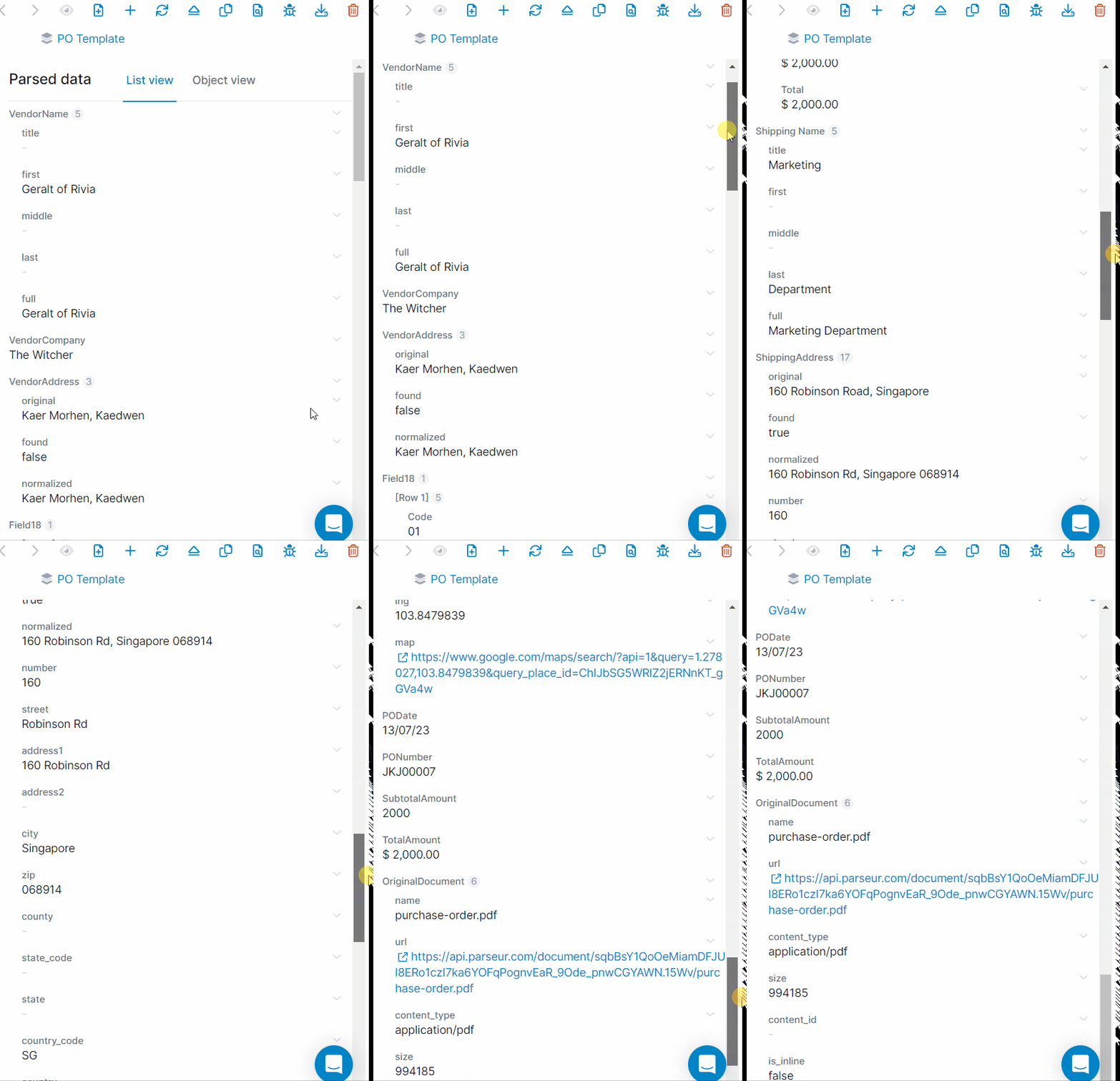
Parseur shows the parsed fields next to the original document, so you can confirm everything was captured before it moves on.
Step 4: Send PO data where it needs to go
- Push to a shared Google spreadsheet in real time
- Route into your ERP or MIS, Dynamics 365 included, through Power Automate, Zapier, Make, or a webhook. The purchase orders to Power Automate walkthrough covers that route step by step
- Pull the structured JSON straight from the API if your system speaks REST, the same way teams move invoices into an ERP
Your customers will never agree on a PO format
They are not going to stop sending purchase orders either. The one thing you can change is who reads them. Hand that job to Parseur and the fields land in your ERP the day the order arrives, clean and complete, while your team goes back to the work that needs a person.
Last updated on