Right to Work documents are a legal requirement for UK employers. This guide shows how Parseur helps automate document data extraction, making it easier to organise records and reduce manual administration.
Key Takeaways:
- Automate the extraction of passport, immigration document, and share code information to reduce manual data entry during Right to Work checks.
- Keep candidate records organised with structured document data, helping HR teams manage expiry dates and maintain supporting documentation.
- Use Parseur to capture data from incoming emails and documents and send it directly to your HR systems via integrations or its API.
Every UK employer has a legal responsibility to confirm that a new employee has the right to work before they start. Carrying out these checks correctly helps employers establish a statutory excuse against civil penalties if an employee is later found not to have the right to work in the UK. Failing to follow the correct process can result in penalties of up to £45,000 per illegal worker for a first breach, rising to £60,000 for repeat breaches. The Home Office continues to enforce these requirements through regular compliance activity.
According to UK Government Publications, 525 civil penalties were issued to employers, 620 illegal workers were identified, and the gross value of penalties totalled £26.47 million during the period 1 October to 31 December 2025, highlighting the importance of maintaining compliant Right to Work procedures and accurate records.
Depending on the employee's circumstances, a Right to Work check may involve reviewing a British or Irish passport, completing an online check using a Home Office share code, or confirming immigration status through the Home Office's digital service. Employers must also record key details, identify any restrictions on the individual's permission to work, retain evidence of the check, and carry out follow-up checks where required.
Managing these tasks manually can quickly become time-consuming, particularly for recruiters and HR teams processing multiple candidates each week. According to the Office for National Statistics (ONS), there were around 707,000 job vacancies in the UK between March and May 2025, illustrating the volume of recruitment activity many employers continue to manage. As hiring volumes increase, copying names, passport numbers, and expiry dates into HR systems increases the risk of typing errors, overlooked work restrictions, and missed follow-up checks, all of which can create additional administrative work and compliance risks.
This guide shows how recruiters and HR teams can automate the document processing side of Right to Work checks with Parseur. By extracting key information from passports and other supporting documents, routing it into HR systems, and helping to maintain organised records, teams can reduce administrative overhead while supporting a more efficient hiring workflow. The Right to Work verification should still be completed in accordance with the latest Home Office guidance.
Manual Right to Work Checks: The Compliance Burden
Every employer in the UK must carry out a Right to Work check before a new employee starts work. To establish a statutory excuse against civil penalties, employers must complete the check correctly, retain evidence of it for the duration of the individual's employment and for two years afterwards, and record the date the check was carried out. If these requirements are not met, businesses may face significant penalties if they are found to have employed someone without the right to work.

For many recruiters and HR teams, the process still begins with an email from the candidate containing a mixture of documents. These may include a passport scan, visa documentation, or details needed to complete a Home Office online check. The files often arrive in different formats, ranging from high-quality PDFs to photographs taken on a mobile phone, making them harder to review consistently.
Someone then needs to open each document, locate the relevant information, and manually enter it into an applicant tracking system (ATS), an HR platform, or a spreadsheet. This usually includes the candidate's name, date of birth, passport number, nationality, document expiry dates, and any visa-related information. If the candidate has time-limited permission to work, HR must also identify any conditions attached to their immigration status and note when a follow-up check will be required.
Once the information has been entered, the documents need to be stored securely, along with a record of when the Right to Work check was completed. In many organisations, this means saving copies to shared folders, attaching them to candidate records, or filing them manually. Without a consistent process, expiry dates can be overlooked, records become difficult to locate, and demonstrating compliance during a Home Office inspection becomes more challenging.
This is particularly important given that human error continues to be one of the leading causes of personal data breaches reported to the Information Commissioner's Office (ICO), highlighting the importance of managing employee documentation through consistent, well-organised processes.
As hiring volumes increase, so does the administrative burden. Even if each candidate takes only 10 to 15 minutes to process, recruiters handling dozens of new starters every month can spend hours copying information between documents and internal systems. The work is repetitive, but accuracy matters because even small mistakes can have wider consequences.
Common issues include:
- Typing passport or document numbers incorrectly.
- Recording the wrong date of birth or document expiry date.
- Overlooking time-limited permission to work or follow-up check dates.
- Storing documents in different locations, making them difficult to retrieve later.
- Missing evidence of when a Right to Work check was completed.
These problems often remain hidden until records are reviewed internally or requested during a Home Office inspection. By that stage, correcting missing information or proving that checks were carried out at the appropriate time can be considerably more difficult.
The Automated Process: Candidate Documents to HR System
Step 1: Candidate Submits Documents
The candidate emails their supporting documents:
- passport.pdf
- immigration_document.pdf
- share_code.txt
Step 2: Parseur Extracts Document Data
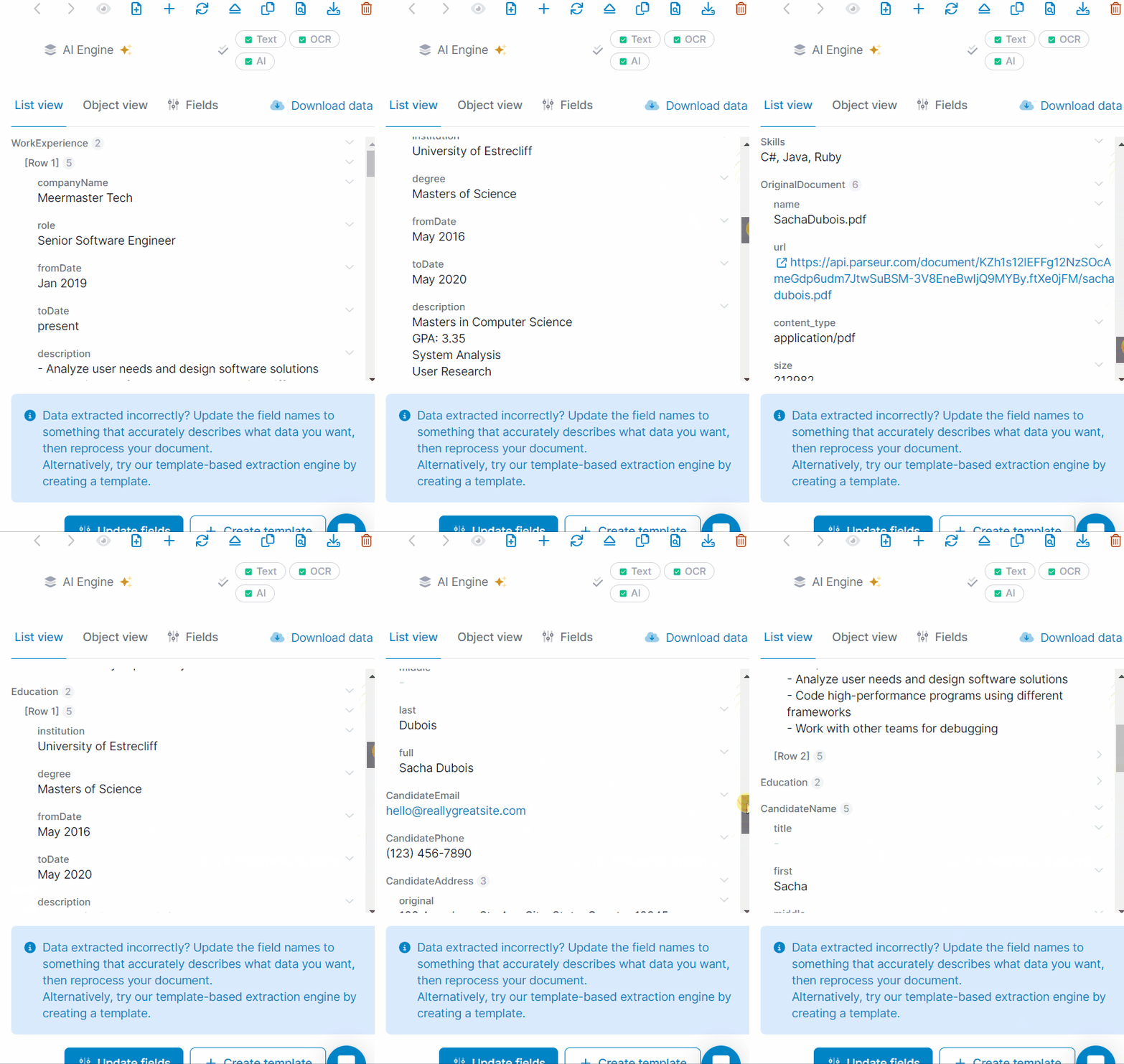
Parseur automatically reads the submitted documents and extracts:
- Full name
- Date of birth
- Nationality
- Passport number
- Passport expiry date
- Document type
- Document reference
- Issue date
- Expiry date
- Share code (if provided)
No manual data entry is required.
Step 3: Send the Data to Your ATS or HR System
Using Zapier, Make, Microsoft Power Automate, or Parseur's API, the extracted data is sent directly to your ATS or HR platform, eliminating the need to enter the same information manually.
Step 4: Complete the Right to Work Check
HR reviews the extracted information and completes the required Right to Work check using the appropriate Home Office process. Where a share code is provided, the employer completes the online check using the Home Office service.
Step 5: Organise Records and Schedule Reminders
- Store supporting documents alongside the candidate record.
- Record the date the Right to Work check was completed.
- Send expiry dates to your HR system or calendar.
- Trigger reminder workflows before time-limited permission expires.
Step 6: Generate Compliance Reports
Automation makes it straightforward to report on:
- Employees with time-limited permission to work
- Documents due to expire in the next 30 days
- Candidate records missing supporting documents
- Right to Work checks processed this month
Impact and Compliance

Eliminate Compliance Risk, Save Time, Protect Your Organisation
Right to Work checks are a legal requirement for every UK employer, but much of the work surrounding them is administrative. Collecting documents, copying information into HR systems, organising records, and tracking expiry dates all take time, particularly when you're hiring regularly.
By automating document processing, recruiters and HR teams can reduce repetitive manual tasks while keeping candidate records organised and easier to manage. Instead of spending time entering passport numbers, document dates, and other details by hand, teams can focus on reviewing the information and completing the required Home Office Right to Work check.
Time Savings
Before automation
A typical recruitment team may spend time on tasks such as:
- Manually extracting information from passports and supporting documents.
- Entering candidate details into an ATS or HR system.
- Organising document copies and candidate records.
- Tracking document expiry dates.
- Preparing records for internal reviews or Home Office inspections.
For organisations hiring around 50 employees each month, these administrative tasks can easily total 17 to 25 hours.
After automation
With Parseur handling document extraction and routing data into your existing systems:
- Document information is extracted automatically.
- Candidate records can be populated without repetitive data entry.
- Supporting documents are stored alongside the extracted data.
- Expiry dates can trigger reminder workflows through your HR platform.
- Reporting becomes easier because records are already organised.
This can reduce the administrative workload to around 1.5 hours per month, with most of the remaining time spent reviewing exceptions and completing the required Right to Work checks.
For a team processing around 50 new hires each month, that's a saving of approximately 15.5 to 23.5 hours every month, or 186 to 282 hours each year. At an estimated administrative cost of £20 per hour, this represents a potential saving of £3,720 to £5,640 annually.
Beyond the time savings, one of the biggest benefits is consistency. Having documents, extracted data, and candidate records stored within a structured workflow makes it easier to retrieve information, monitor upcoming document expiries, and demonstrate that Right to Work records have been maintained when needed. While employers remain responsible for carrying out compliant Right to Work checks in line with Home Office guidance, automating the document-processing stage can significantly reduce the administrative effort.
Supporting Compliance
Automating document processing doesn't replace an employer's legal responsibility to carry out Right to Work checks, but it can make the administrative side of the process more consistent and easier to manage. Good record keeping is an important part of maintaining compliance, particularly when organisations need to retrieve documents or demonstrate that checks have been completed correctly.
The UK Government's Data Quality Framework highlights that poor-quality data increases operational costs, creates inefficiencies, and reduces confidence in business records, reinforcing the importance of maintaining accurate employee documentation. By reducing manual data entry and keeping supporting documents organised, HR teams can spend less time searching for information and more time reviewing candidate records.
Reducing manual data entry
Before: passport numbers or document references are entered incorrectly, expiry dates are recorded incorrectly or overlooked, and candidate details are copied into multiple systems by hand.
After: key information is extracted directly from submitted documents, candidate records can be populated automatically, and less repetitive data entry helps reduce the risk of transcription errors.
Keeping supporting documents organised
Before: passports, immigration documents, and emails are stored in different locations, and candidate records may be incomplete or difficult to retrieve.
After: supporting documents can be stored alongside extracted data, and records are easier to locate during internal reviews or Home Office inspections.
Managing time-limited permission to work
Before: expiry dates are tracked manually in spreadsheets or calendars, and follow-up checks can be missed during busy recruitment periods.
After: document expiry dates can be sent to HR systems or workflow tools, and reminder workflows can help teams prepare for follow-up checks before documents expire.
Creating an audit trail
Before: it may be difficult to show when documents were received or processed, and information is spread across emails, folders, and spreadsheets.
After: document processing can be logged automatically, supporting files remain linked to the relevant candidate record, and HR teams have a clearer history of when documents were received and processed.
By keeping documents, extracted data, and candidate records together in a structured workflow, organisations can improve record-keeping and reduce administrative effort while continuing to carry out Right to Work checks in line with the latest Home Office guidance.
Last updated on